Volume: Adjust / turn off the sounds (Speaker / Notification / Microphone volume).
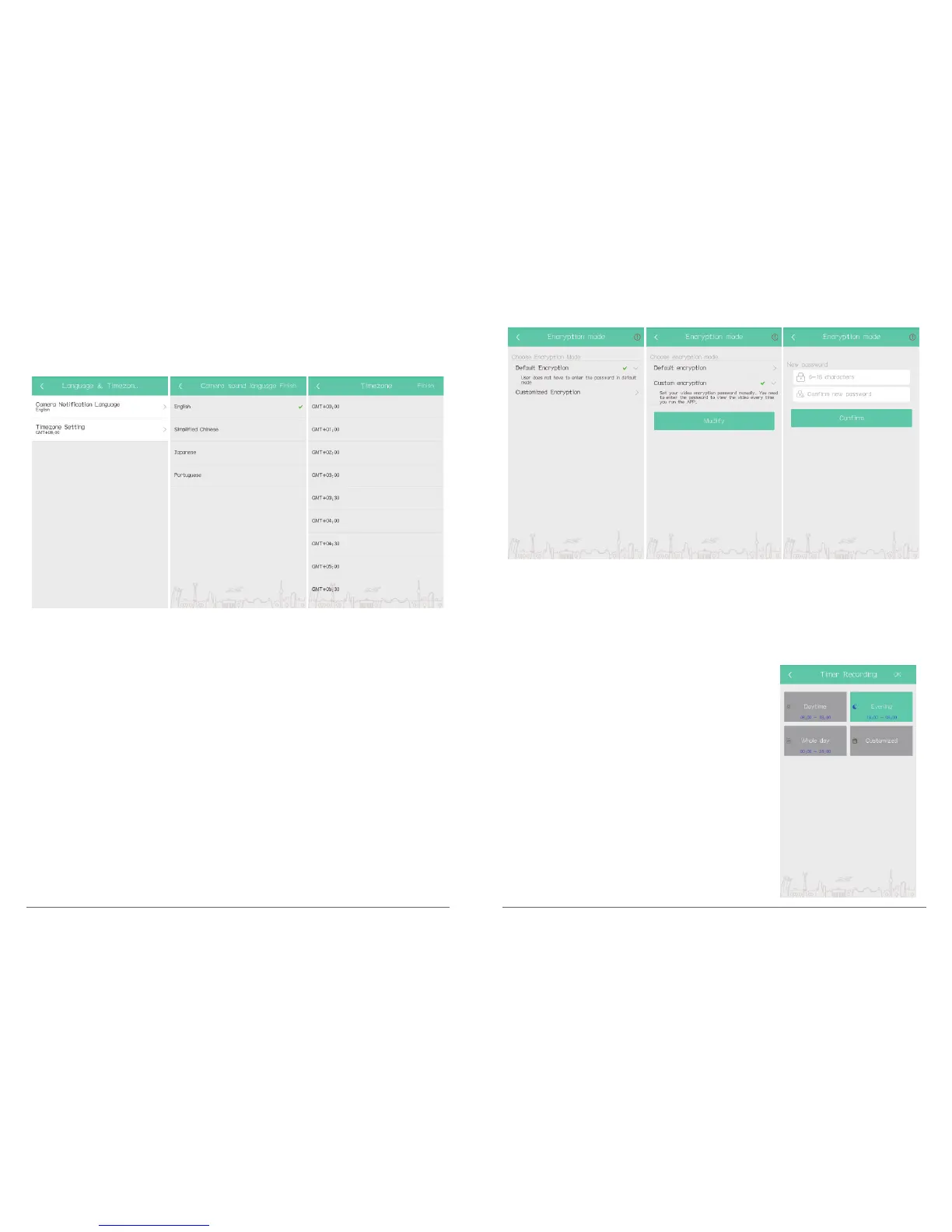
Language & time zone: Set language of camera and select time zone, after setting, click
“OK” to save and exit.
Encryption mode: Set encryption mode to protect the data, Default and custom for
optional. Default is Default encryption.
In Camera Setting interface, click” Encryption mode” to choose Default or Custom
Encryption.
① Default encryption: User does not have to enter the password in default mode
Click”Encryption mode → Default encryption → click “OK” to save and exit”.
② Custom encryption: User set customized encryption password in 6-18 characters, you
need to enter the password when reviewing video every time on phone app.
Click”Encryption mode → Custom encryption → Enter Password and Confirm → OK to
save and exit”.
Note:
① In Custom encryption mode, user needs to enter the customized encryption password
for verification to preview video/view alarm pictures on mobile phone, and other clients
only get blurred images when view the video. Protect your privacy all the time.
② Only camera’s system version in format “v3.xx.xx” supports custom encryption.
Timer Recording: Set camera’s recording time. Four
options: Daytime (08:00-18:00), Evening (18:00-08:00),
Whole day (00:00-24:00), Customized (User defined).
After setting, click “OK” to save and exit.
21 22



 To Next Page