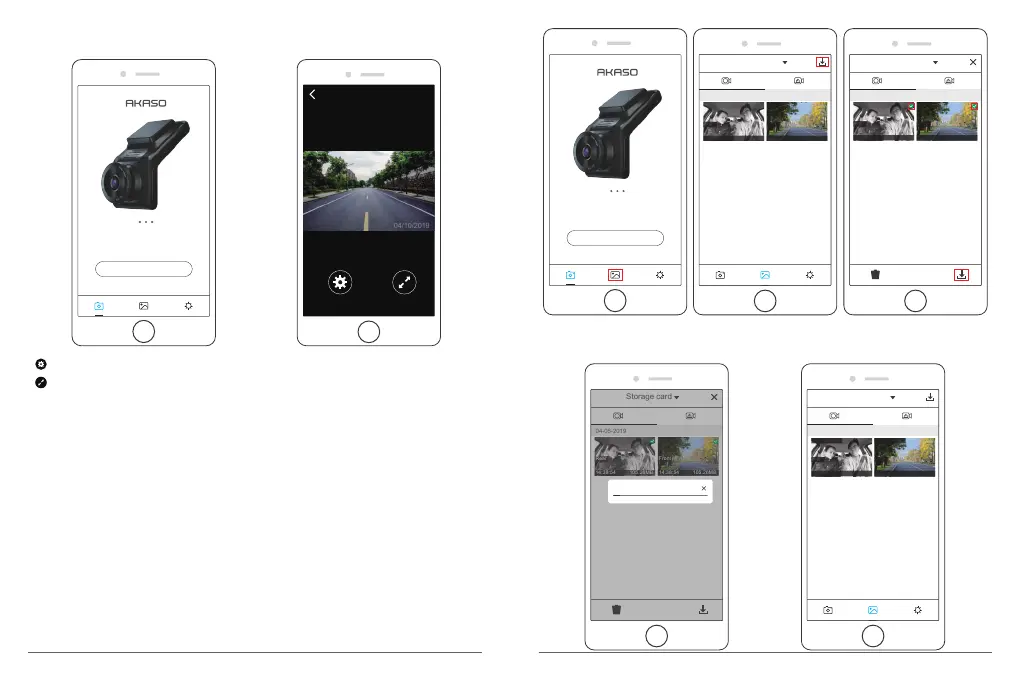
③ Open ”Akaso Car” APP again, click “Connect CAR DVR” to Real-time Preview Interface.
Real-time Preview
Click to enter into the setting interface.
Click to open the full screen on phone.
Note: There is interference between Wi-Fi and GPS. For safety, please turn off the Wi-Fi
before driving to ensure the videos record GPS track.
Connect CAR DVR
S6
4. Download the video
① Open the Wifi of dash cam, and connect to the Wifi through APP ”Akaso Car” on phone.
② Open “Akaso Car”, click to enter into the playback interface
③ All video clips of card will show, then click the download icon on the top right corner,
then select the video clips you want to download, click the icon on the bottom right
corner to download.
Storage card
04-05-2019
14:38:54 105.26MB
Front
14:38:54 105.26MB
Rear
Storage card
04-05-2019
14:38:54 105.26MB
Front
14:38:54 105.26MB
Rear
Connect CAR DVR
S6
④ Wait for a while, after finishing the download, you will see “Downloaded” on the video
clips, see following:
Storage card
04-05-2019
14:38:54 105.26MB
Front
14:38:54 105.26MB
Rear
Downloading......1/2
Storage card
04-05-2019
14:38:54 105.26MB
Front
14:38:54 105.26MB
Rear
Downloaded Downloaded
15 16


 To Next Page