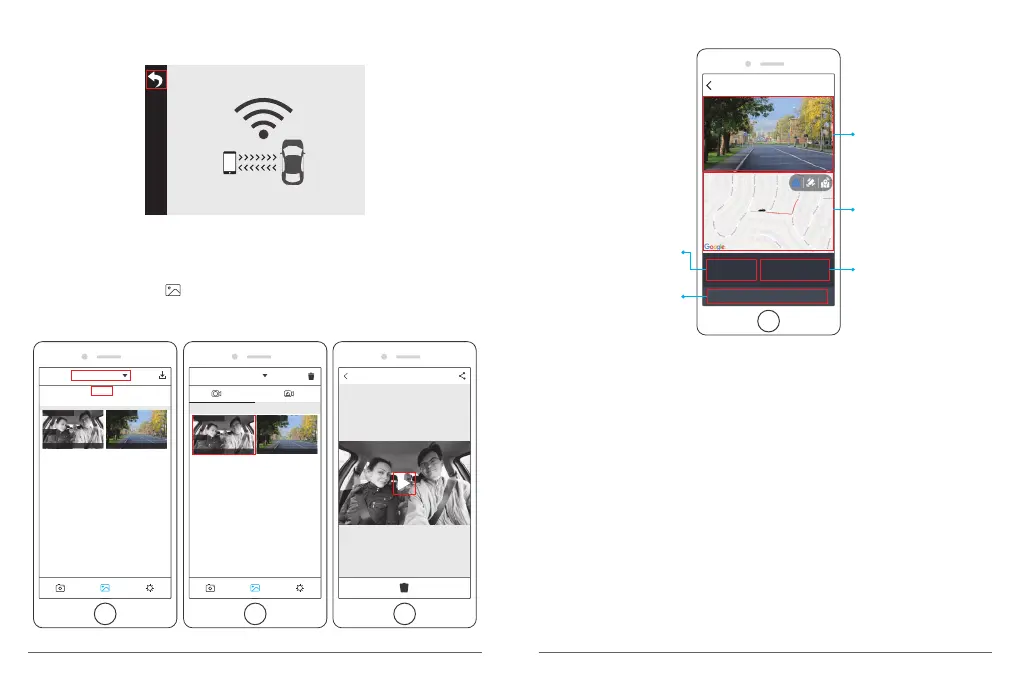
⑤ Press Wi-Fi button on the bottom of camera to turn off Wi-Fi.
Then the Wi-Fi connection is disconnected from phone.
WiFi Connected
MAC: 9cfbd5a9be5d
5. Play the video
① Turn off the camera’s Wifi, and open phone network connection.
② Open “Akaso Car”, click to enter into the playback interface.
③ Click “Storage card” to select “Local” to check the downloaded video flips, then click
videos to play.
1/2
Storage card
Storage card
Local
14:38:54 105.26MB
Front
Downloaded
14:38:54 105.26MB
Rear
Downloaded
Local
04-05-2019
14:38:54 105.26MB
Front
Downloaded
14:38:54 105.26MB
Rear
Downloaded
④ When the video is play on phone, the GPS data will be displayed, see below:
44.89 km/h
LAT: 34.016958
LON: 118.364180
DATE: 04\28\2019 TIME: 15:20:05
2019_0428_191520_007_FR.MP4
GPS 04/28/2018/ 15:20:05
Video footage
The driving route on
the map for the current
video.
The current video's
recording speed per hour.
The current video's
recording longitude and
latitude coordinates.
The current video's
recording date and time.
The current video’s recording speed per hour.
The current video’s recording date and time.
Video footage
The driving route on the map for the current video
The current video’s recording longitude and latitude coordinates.
Note:
① When watch the download videos, it must be turn off the camera's WiFi to get the GPS
track.
② When you parking at outside, the GPS need about 3 minutes to search and positioning,
please wait patiently.
17
18


 To Next Page