6. Phone APP Settings
It will be synchronized to the camera directly when you change the setting information on
Phone App.
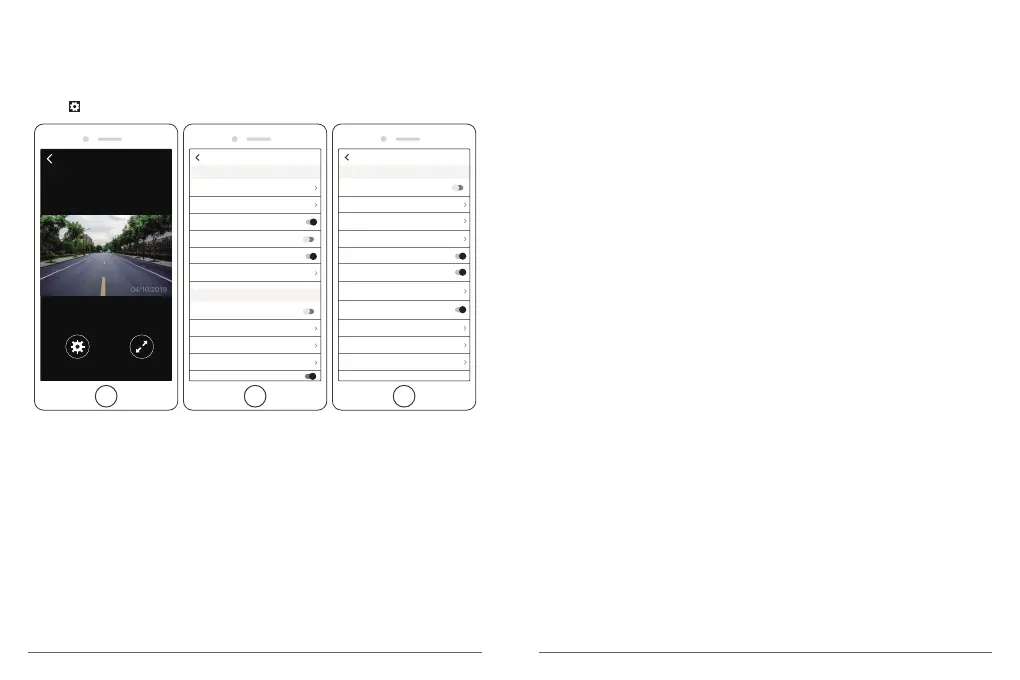
① Open Phone APP ”Akaso Car”, click “Connect CAR DVR” to Real-time Preview Interface.
② Click to enter to setting interface.
Real-time Preview
1080P DUAL 1080P
3Min
Low
Front/Rear
60HZ
1Min
Beep Sound
Screen Save
Frequency
Dual Cam Display
Parking Monitor
Other Setting
Date Stamp
GSENSOR
Record Audio
WDR
Loop Recording
Resolution
Video Setting
Setting
Front/Rear
60HZ
2H
Default Setting
Format
WIFI Setting
FatigueDrivingReminder
TimeClock
Time system
Beep Sound
Gps Speed
Screen Save
Frequency
Dual Cam Display
Parking Monitor
Other Setting
Setting
12H
1Min
Video Setting
Resolution - 2K30, 1080P60, 1080P DUAL 1080P for options,default is 1080P DUAL 1080P.
Loop Recording - OFF, 1Min, 3Min, 5Min for options, default is 3 minutes.
The files will be saved every 3 minutes if you choose 3 minutes. When the memory card is
full, the new files will cover the old one if the loop recording is on; If you off loop recording
function, the camera won’t work any more when sd card is full, please format the SD card
or change a new one.
WDR (Wide Dynamic Range) - Turn on/off for options, default is on.
Balance light and darkness in driving to get the best image quality automatically.
Record Audio - Turn on/off for options, default is on. Allows the recorded videos with
sound or no sound.
Date Stamp - Turn on/off for options, default is on. Show the date and time on videos.
GSENSOR - OFF, Low, Medium, High for options, default is low.
Gravity Sensor means any collision will activate the camera to record, and the videos will be
locked so it will never be covered by new files.
It is suggest to adjust it to low level or turn off it directly to prevent from too many locked
files in SD card. And it is recommend to adjust it to medium level during parking.
Other Setting
Parking Monitor - Turn on/off for options, default is off.
The cam will automatically start up and record about 30-second video once it detects any
external force during parking.
Dual Cam Display - Front, Rear, Front/Rear for options, default is Front/Rear.
This dash cam has 3 optional display mode:
1. Front and rear mode: The big view for front camera,
the small view for rear camera(default).
2. Front mode: Only display the front on the screen.
3. Rear mode: Only display the rear on the screen.
Frequency - 50Hz, 60Hz for options,default is 60Hz.
Screen Save - ON, 30Sec., 1Min, 2Min for options, default is 1 Minute.
The screen will turn off automatically within the time you set,but still keep recording.
It is more convenient and safe for driving at night with keeping the screen off.You can
activate the screen again by pressing any button.
Beep Sound - on/off for options, default is on. Turn on/off the button sound.
GPS Speed - on/off for options, default is on. You can set it to show or not show the GPS
Speed on your recording videos.
Time System - 12H, 24H for options, default is 12H.
TimeClock - on/off for options, default is on.
Fatigue Driving Reminder - OFF, 1H, 2H, 4H for options, default is off. It will pop out tips
when you are fatigue driving.
WIFI Setting - Change the WiFi name and password of dash cam on APP.
Format - Format the memory card.
Default Setting - Restore factory default settings.
19
20


 To Next Page