Note:
① All data will be deleted. Before formatting your memory card, please remember to
backup your important data on your other devices.
② Every time you insert a micro SD card, please format it in the camera to ensure that the
micro SD card is compatible with the camera well.
PLAYBACK VIDEOS
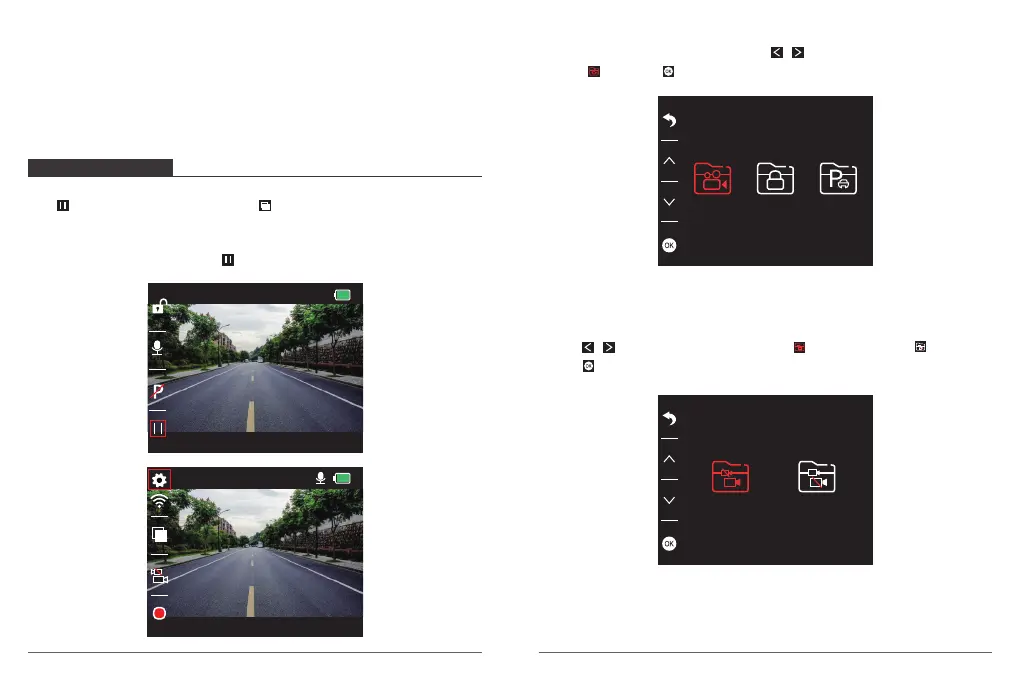
1. Playback Videos on Dash Camera
Press button to stop recording firstly, press to enter to playback mode .There are 3
folder in playback mode. 1st one is the folder is the unlocked video, 2nd is the folder for
locked video,and the 3rd is the folder for parking monitor’s video.
Choose the video you need and press to playback it on this camera.
Playback the Unlocked Videos
① After entering the playback interface, press / to choose the folder of unlocked
videos , then press .
② Press / to choose the folder of front video or rear camera video , then
press .
05 06
00:00:23
1080P60
05/28/2019 03:25:52 PM
01:17:34
1080P60
05/28/2019 03:26:52 PM


 To Next Page