SETTINGS ON DASH CAM
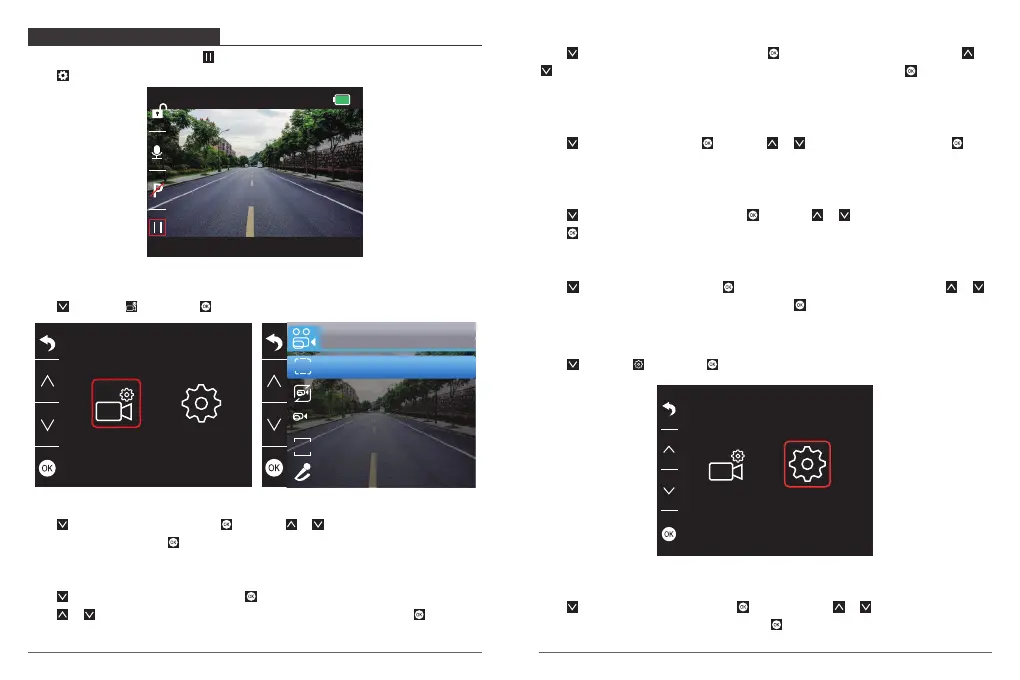
After turning on the camera, press button to stop recording firstly.
Press to enter into the settings interface.
Video Settings
Press to choose , then press to enter into video settings.
00:00:23
1080P DUAL 1080P
05/28/2019 03:25:52 PM
Video
Record Audio
Loop recording
WDR
WDR
Dual cam Display
1
Front
Resolution
SIZE
Resolution - 2K30, 1080P60, 1080P DUAL 1080P for options, default is 1080P DUAL 1080P.
Press to choose “Resolution”, press and press or to choose “2K30 or 1080P or
1080P DUAL 1080P”, press to confirm and exit.
Loop Recording - Off, 1 Minute, 3 Minutes, 5 Minutes for options, default is 3 Minutes.
Press to choose “Loop recording”, press to enter loop recording settings, and then
press or to choose ”Off or 1 Minute or 3 Minutes or 5 Minutes”, press to confirm
and exit.
Dual Cam Display - Front,Rear,Front/Rear for options.Default is Front/Rear.
Press to choose “Dual Cam Display”, press to enter this settings,and then press or
to choose “front” or ”rear” or “front/rear” option as your prefer, press to confirm and
exit.
WDR (Wide Dynamic Range) - Off, On for options, default is on.
Press to choose “WDR”, press and press or to choose ”Off or On”, press to
confirm and exit.
Record Audio - Off, On for options, default is on.
Press to choose “Record Audio”, press and press or to choose ”Off or On”,
press to confirm and exit.
G Sensor - Off, Low, Medium, High for options, default is Low.
Press to choose “G Sensor”, press to enter G-sensor settings and then press or
to choose ”Off or Low or Medium or High”, press to confirm and exit.
System Settings
Press to choose , then press to enter into video settings.
Screen Save - Off, 30 Sec, 1 Minute, 2 Minutes for options, default is 1 Minute.
Press to choose “Screen save”, press , and then press or to choose off /
30seconds / 1minute / 2minutes option, press to confirm and exit.
21
22


 To Next Page