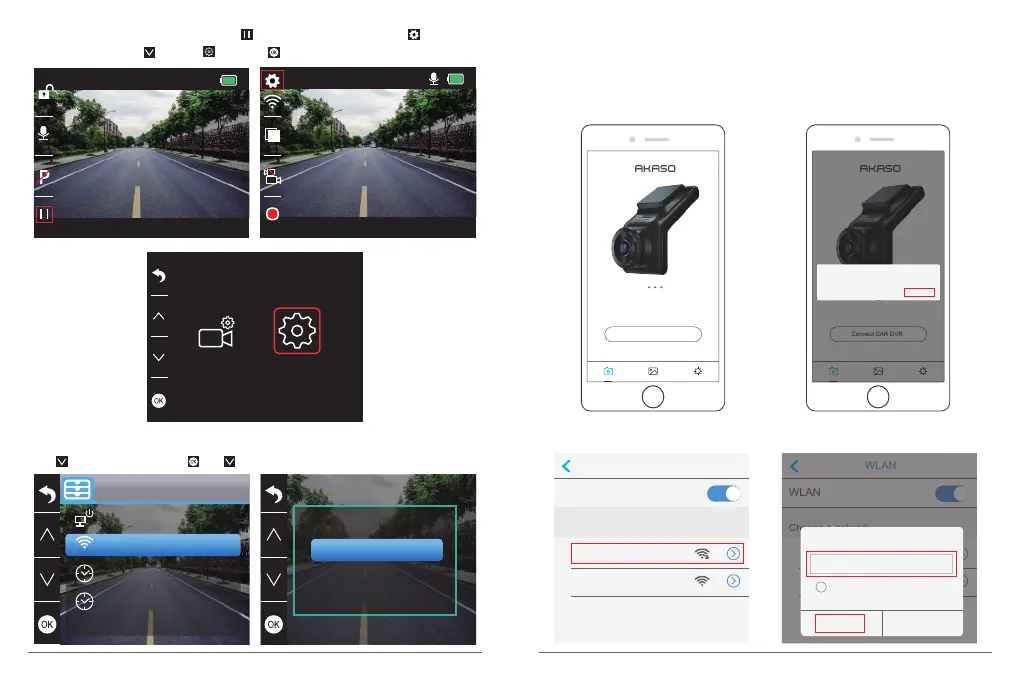
Way2. After turning on the camera, press to stop recording, short press to enter
setting interface, press and click and press to enter Setup interface.
00:00:23
1080P60
05/28/2019 03:25:52 PM
01:17:34
1080P60
05/28/2019 03:26:52 PM
Press to choose “WiFi”, press and choose “On” to enable WiFi.
Off
On
Setup
Date/Time
Time System
Screen Save
WiFi
WiFi
3. Phone APP Connection
① Open Wifi of dash cam, please refer to the above part of “Turn on Wifi Connection”
② Open ”Akaso Car” APP on phone, click “Connect CAR DVR” to enter into phone Wi-Fi
system, find the camera’s SSID and input the PWD for connecting the Wi-Fi of this
camera, then exit and back to the phone app.
WLAN
WLAN
DVR2032333428fc
Choose a network
AKASO
WLAN
WLAN
DVR2032333428fc
Choose a network
AKASO
DVR2032333428fc
Show possword
Connect Cancel
•••••••••
Connect CAR DVR
S6
Connect CAR DVR
S6
Please confirm your connection to
the CAR DVR Wi-Fi.
CANCEL CONFIRM
13
14


 To Next Page