2. Playback recorded videos on Computer
Download Videos from Micro SD Card
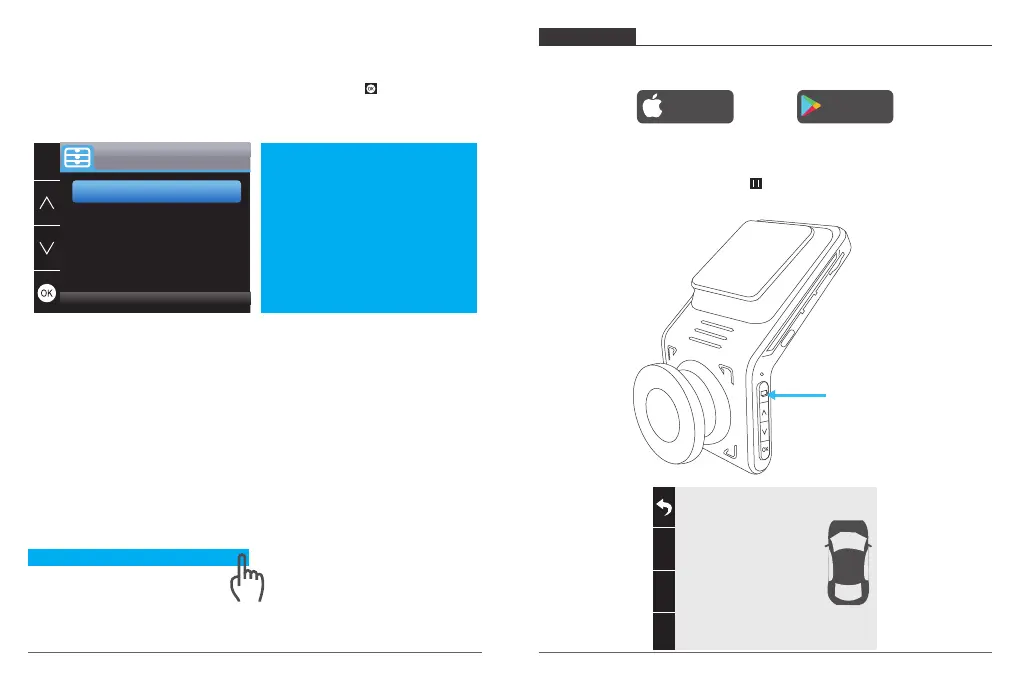
Way1. Connect the dash cam to the USB port of computer via USB cable;
Choose ”Memory Mode” option on the screen of dash cam, press ;
”Mass Storage” will pop out on the screen of dash cam, then you can copy the videos
from micro SD card.
USB
Record Mode
Memory Mode
Mass Storage
Note: The computer can be directly used as the power supply for the dash cam if you
choose the “Record Mode” and the camera will automatically start recording.
You can real-time preview, record, change the Settings etc.
Way2. Take out the micro SD card from the dash cam, then insert the micro SD card to the
micro SD card reader and insert the micro SD card reader into the USB port of the
computer to obtain the videos in the micro SD card.
Play Videos on Computer
Please copy the following link on any browser to download AKASO player, then play the
videos which get from the micro SD card.
Note: Please close the anti-virus software on computer before installing the player or click
“allow” when prompted.
PHONE APP
1. Download Phone APP
Download the “Akaso Car” app, search for it in one of the app stores below.
Download on the
App Store
GET IT ON
Google Play
2. Turn on Wifi Connection
Way1. After turning on the camera, press button to stop recording, long press WiFi
button(first button on the left of camera) to enter WiFi settings interface.
WiFi Button
Note: WiFi is on, please
connect
SSID: DVR2032333428fc
PWD: 12345678
11
12
https://www.akasotech.com/akasoplayer


 To Next Page