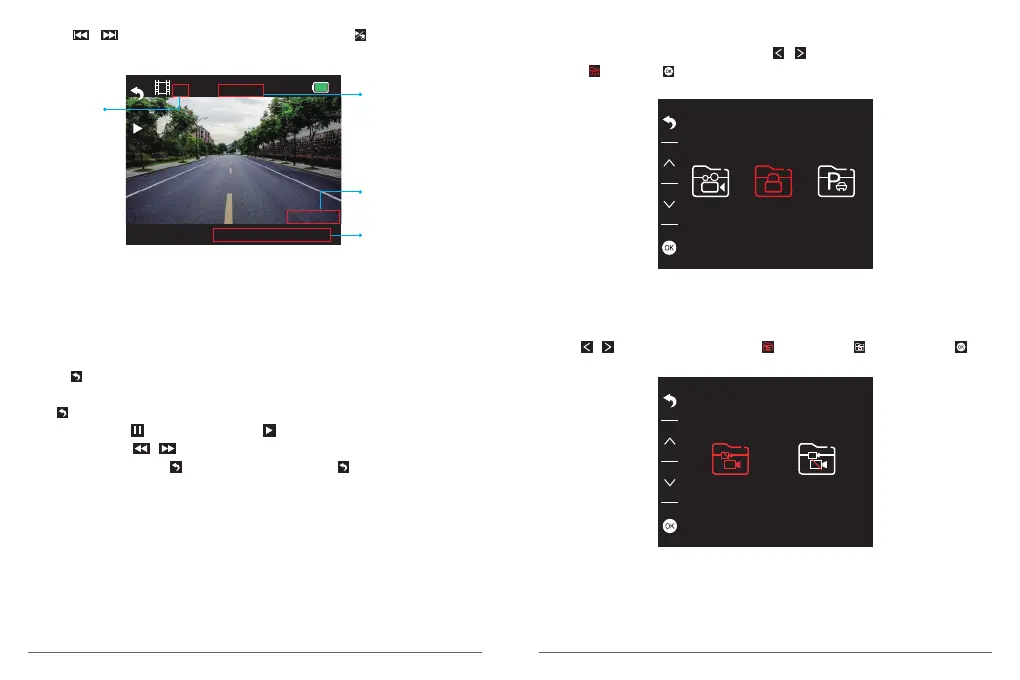
③ Press / to choose the video you need, last short press to playback the video
you selected.
1080P60
05/28/2019 15:20
1/1 00:00:06
The time schedule
of video playing.
The video's
quantity
The current video's
recording date and
time
The current video's
recording resolution
The quantity of recorded video in this folder.
The time schedule of current video.
The recording resolution of current video.
The date and time stamp of current video.
④ Press to exit when you finish to playback the video.
Note:
Press one time to stop playing , press again to exit the current playing folder.
When playing, press to pause playing, press to start playing again.
When playing, press / to to backward/forward, 2X/4X/8X for options
After pausing playing, press one time to end playing, press twice times to exit the
current playing folder.
Playback the Locked videos
① After entering the playback interface, press / to choose the folder of locked
videos , then press ;
② Press / to choose the folder of front or rear camera video, then press ;
07
08


 To Next Page