Troubleshooting
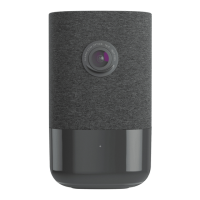
1. If you have issues connecting the camera to the account, power cycle the camera and try again.
2. If issues persist, press and hold the reset button located on the bottom of the camera until the LED is flashing
Green and Red (about 15 seconds), then release the button. The camera will reboot with factory defaults. For
more details about the reset process, see Factory reset an ADC-V523/523X to its default settings.
Important: If the camera was previously installed to a different Alarm.com account, it will need to be deleted before it
can be installed again.
Questions?
• For general information about video setup and frequently asked questions, see General Video Information.
• For troubleshooting help, see https://www.alarm.com/supportcenter.
Español
Lista de verificación previa a la Instalación
• Cámara ADC-V523X (incluida).
• Adaptador de corriente alterna (incluido).
• Conexión inalámbrica (2.4 o 5 GHz) a Internet de banda ancha (Cable, DSL o fibra óptica).
• Se requiere un computador, tableta o teléfono inteligente con Wi-Fi si el enrutador no tienen la función de
configuración protegida de Wi-Fi (WPS).
Hay tres opciones para conectar el ADC-V523X a Internet: Modo punto de acceso (AP), modo de
configuración protegida Wi-Fi (WPS) y modo Ethernet. Utilice el modo WPS si tiene acceso fácil al enrutador del cliente
y el enrutador tiene la función WPS habilitada. Tenga en cuenta que algunos proveedores de servicios de Internet
deshabilitan la función WPS en los enrutadores del cliente. El modo AP es el método inalámbrico más confiable para
instalar este dispositivo.
Incluido en caja
• Cámara ADC-V523X
• Lámina de montaje
• Fuente de alimentación
• UGuía de usuario
• Anclajes de pared & tornillos (x2)
Descripción general
1. Indicador LED
2. Lamina de montaje
https://answers.alarm.com/Partner/Installation_and_Troubleshooting/Video_Devices/1080p_Indoor_Wi-Fi_Camera_ADC-V52…
Updated: Tue, 08 Oct 2024 16:21:33 GMT
6


 To Next Page
 Loading...