22
English
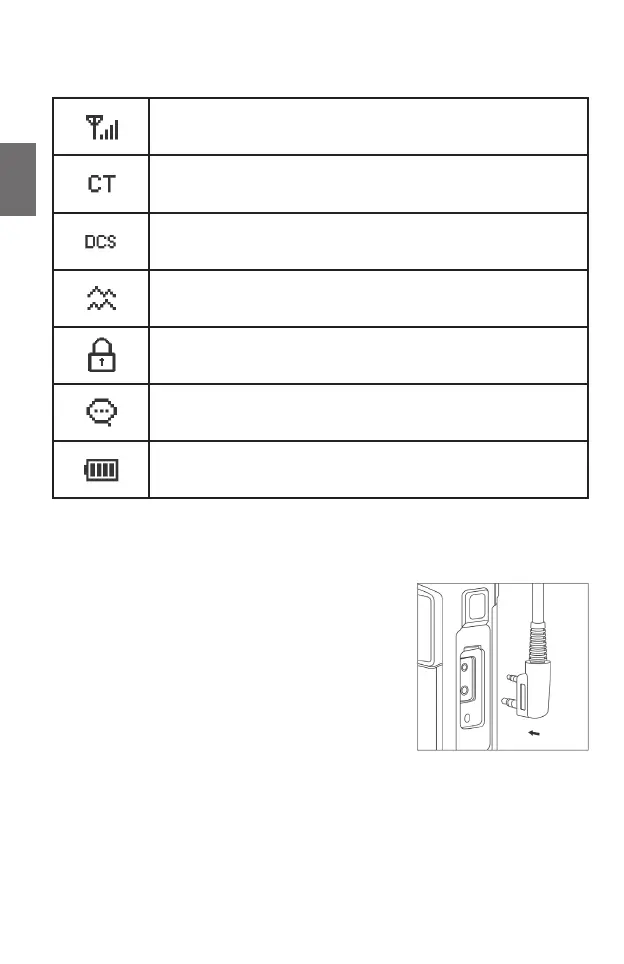
3.4. Display symbols
Signal strength
CTCSS activated
DCS activated
Dual-channel monitoring
Key lock
VOX handsfree function
Battery status
3.5. Headset connector
Connect the plug of the headset to the “Speaker / Mic” socket
on the right-hand side of the radio; you can of course also
connect any external microphones / earphones / headsets to
the radio if they are equipped with a connector according to
the “Kenwood” standard.
Note: The Tectalk Duo is not waterproof when using external
accessories. Please make sure that the rubber cover of the
accessory socket is closed if you are not using external
accessories.





 To Next Page