24
English
6. Sending and receiving
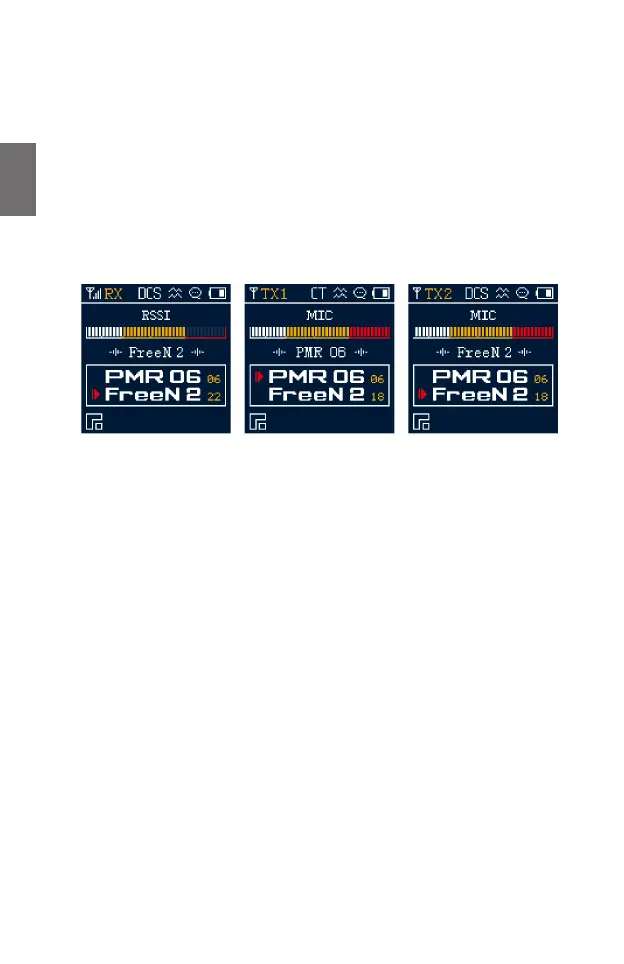
When the radio is switched on, it is automatically in receive mode as long as you are not
transmitting. When a radio message is received, the status indicator lights up green and the
display shows “RX”. Adjust the volume using the rotary switch on the top of the device.
To transmit, press and hold the corresponding PTT (transmit) button and speak into the
microphone at normal volume and at a distance of approx. 5 cm. The status indicator lights up
red during transmission. Release the PTT button at the end of your transmission.
Two channels can be selected simultaneously. To transmit on the primary channel (upper entry
in the display), press the PTT-1 button (display: TX1), to transmit on the secondary channel
(lower entry in the display), press the PTT-2 button (display: TX2).
6.1. Channel selection
The radio has 16 PMR446 and 6 Freenet channels. Select the desired channel using the ▼/▲
buttons or directly using the keypad. The 6 Freenet channels are stored in memory locations
21 to 26.
Whether you are changing the primary or secondary channel is indicated by the arrow in the
display. Switch between the two channels by pressing the EXIT button.
7. Main menu
Open the main menu with the MENU button to adjust the settings of the device. Navigate with
the ▼/▲ buttons and conrm your selection with the MENU button. You can go back one menu
level using the EXIT button.
The main menu contains the following submenus:
• Radio settings
• VOX function
• Device settings
• CTCSS and DCS settings
• Channel settings
• Language
• Version information
• Resetting the device to factory settings





 To Next Page