23
English
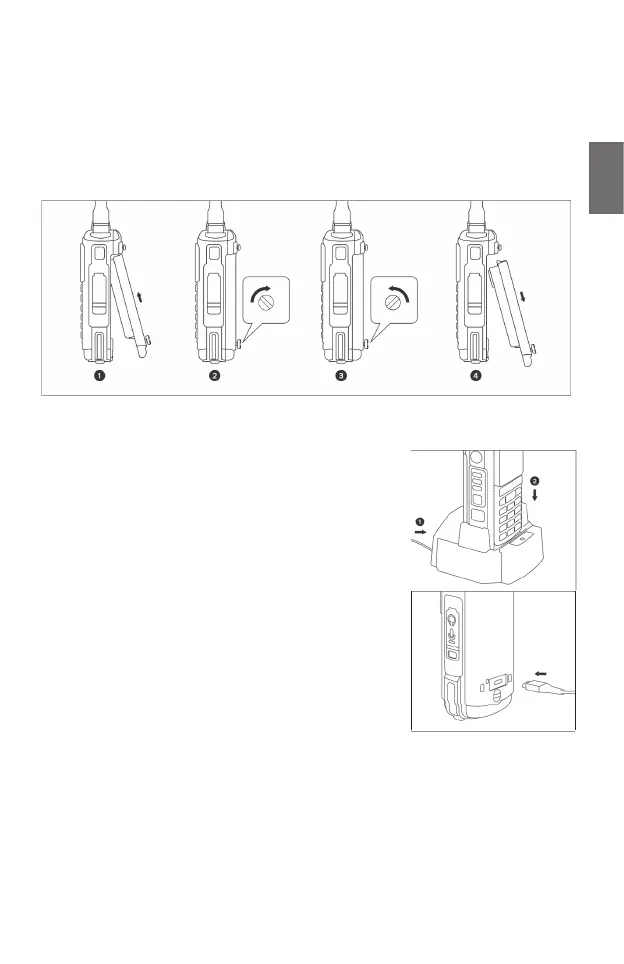
4. Installing and changing the battery
Insert the battery into the device by rst hooking it in at the top and then pressing it into
place at the bottom. Secure the battery by tightening the locking screw clockwise using a
screwdriver, coin or similar. Make sure to tighten the screw completely to ensure that the
device is watertight.
Remove the battery in reverse order.
5. Charging the radio
Please fully charge the battery pack once before using the radio
for the rst time. You can charge the radio either via the desktop
charger supplied or via an USB-C cable and a suitable USB
power source. The fastest charging time is achieved with the
stand charger.
1. Connect the mains adapter to a power outlet and connect
it to the desktop charger.
2. Insert the radio into the desktop charger.
3. Ensure that the battery contacts are in good contact with
the charging cradle. The LED on the desktop charger
lights up red during the charging process.
4. The device should be fully charged after approx. 5 hours
of charging. The LED indicator will now light up green.
Alternatively, you can connect an USB-C cable directly to the
battery, even if it is not inserted into the radio. The LED next to
the USB-C socket indicates the charging status. Charging this
way can take longer than in the desktop charger.





 To Next Page