12
3
Phone call ���������������������������������������������������������
3�1 Making a Call
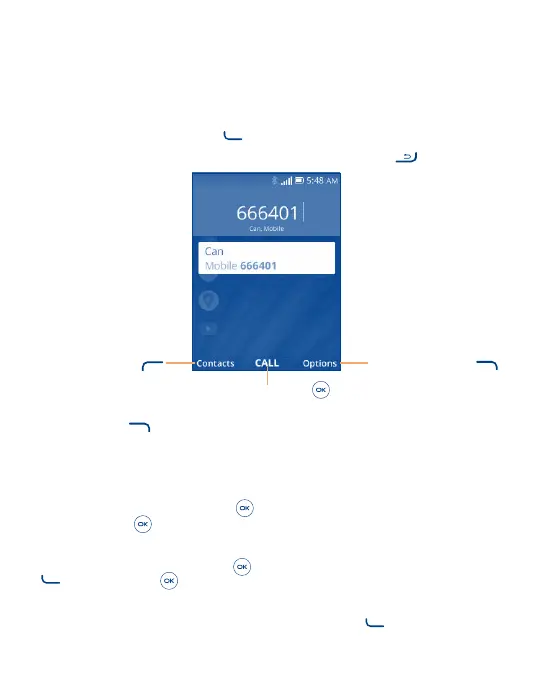
Dial the desired number then press the Call Key to make the call.
If you make a mistake, you can delete the incorrect digits by pressing the End/Power Key
.
Press the Right Soft Key
to show more Options
Press the Center Soft Key
to Call the entered number
Press the Left Soft Key
to enter Contacts
Press the Right Soft Key
to display more Options:
• Add to existing contact: Add the entered number to replace the existing contact number.
• Create new contact: Create a new contact with the entered number.
Make a call from your call log
From the Home screen, press the Center Soft Key
to access the call log and choose the contact you want to dial,
press the Center Soft Key to make the call.
Make a call from Contacts
From the Home screen, press the Center Soft Key
> Contacts. Choose the contact you want to dial, press the Call
Key
or the Center Soft Key twice to call.
Making an emergency call
If your phone has network coverage, dial emergency number and press the Call Key
to make an emergency call. This
works even without a SIM card and without typing the PIN code.



 To Next Page