14
4
Contacts �����������������������������������������������������
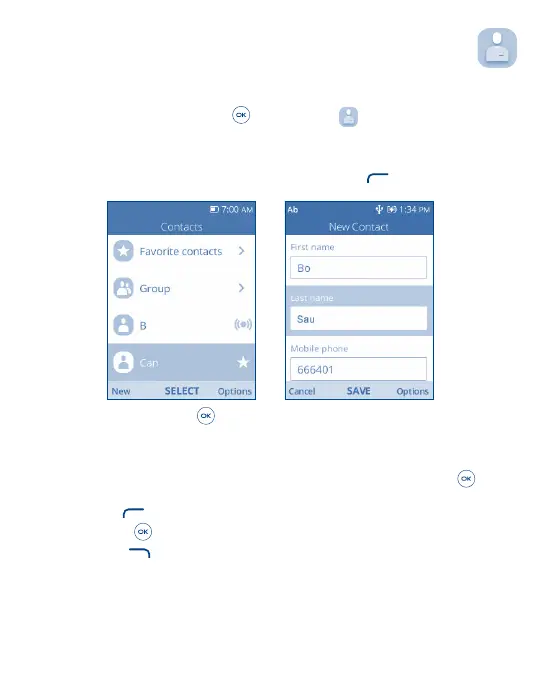
Contacts enables quick and easy access to the contact you want to reach.
From the Home screen, press the Center Soft Key
and select Contacts to enter Contact list.
4�1 Add a Contact
On the contacts list screen, use the Navigation Key and press the Left Soft Key to create a New Contact and
input the contact information.
When finished, press the Center Soft Key to save.
4�2 View a Contact
On the contacts list screen, use the Navigation Key to select a Contact, then press the Center Soft Key to access
the detail screen.
Press the Left Soft Key
to send an SMS/MMS to the contact you selected.
Press the Center Soft Key
to make a call.
Press the Right Soft Key
to access Options:
• Set as quick dial: Set the contact as the Quick Dial Button emergency number.
• Add as Favorite: Add the contact as a Favorite number. You can view it in Contacts > Favorite contacts list. After
added, the menu shows Unfavorite.
• Edit/Share/Delete: Edit/Share/Delete the contact.



 To Next Page