18
5
Messages ���������������������������������������������������
Use the messaging feature to send and receive text (SMS) and multimedia (MMS) messages.
5�1 Sending a Text Message
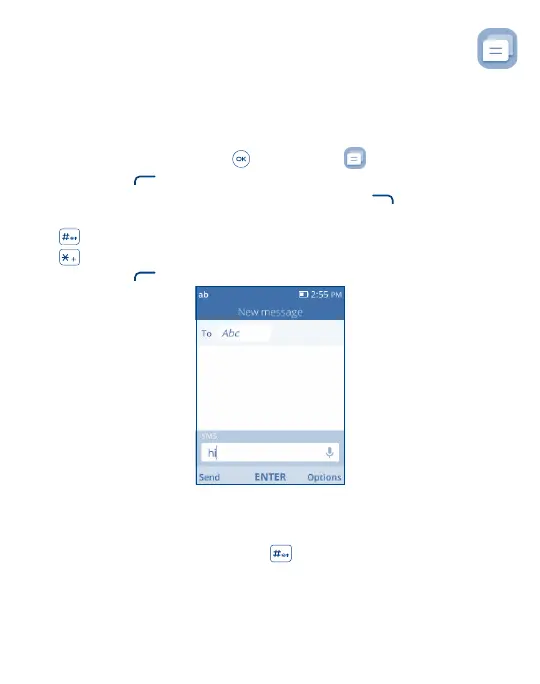
From the Home screen, press the Center Soft Key and select Messages to enter Messages.
• Press the Left Soft Key
to write a new message.
• Enter the phone number of the recipient in the To bar or press the Right Soft Key
to add recipients.
• Use the Navigation Key to go to the SMS bar to enter the text of the message.
• Press
Key to switch between the different methods.
• Press
Key to select symbols.
• Press the Left Soft Key
to send text messages.
5�1�1 Inputting Text
There are different ways to enter text to create contacts, write emails or send messages.
You may choose from the different methods by pressing the
key and alternate between:
• Abc (sentence case), abc (lower case), or ABC (caps lock case): with this mode you must press each key multiple times
to create each letter. For example, an ‘S’ is created by pressing the ‘7’ key four times. An ‘e’ is created by pressing
‘3’ twice, and so on.



 To Next Page