23
7
Application ��������������������������������������������������������
7�1 Calendar �������������������������������������������������������������������������������������������
Use the Calendar to keep track of important meetings, appointments, etc.
To access this function, press the Center Soft Key
from the Home scree and select Calendar.
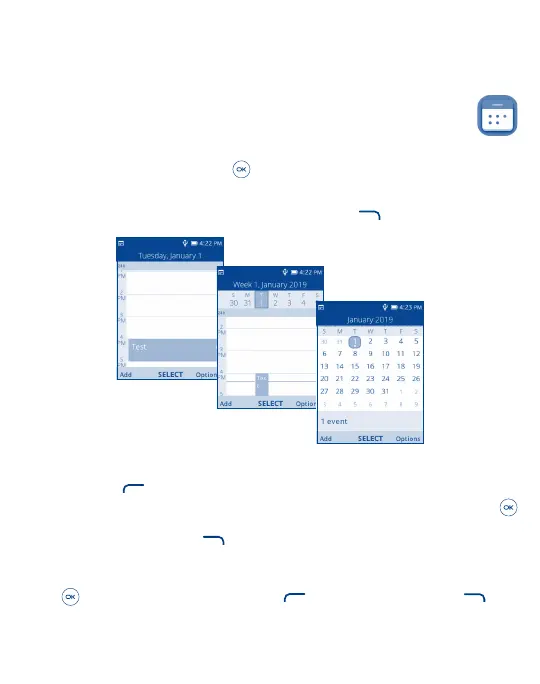
View Calendar
You can display the Calendar in Day, Week, Month view. Press the Right Soft Key
to change your Calendar view.
Day view
Week view
Month view
Create New Event
Press the Left Soft Key
to add new events from any Calendar view.
• Fill in all required information for this new event. If it is a whole-day event, you can press the Center Soft Key
to select All-day Event.
• When finished, press the Right Soft Key
to save.
Delete and Edit Event
After new event is created, under Month view or Day view, use the Navigation Key to move to the event. Press the Center
Soft Key
to show events list, then press the Left Soft Key to delete or press the Right Soft Key to edit.



 To Next Page