21 22
Number Function
1 Speaker
2 microSD card slot
3 Microphone
4 Speaker
5 Front camera
6 Headset port
7 Power key & Fingerprint sensor
8 Volume Up/Down
9 Microphone
10 USB Type-C port
11 Charging indicator
12 Micro HDMI port
13 USB port
14 Connectors to keyboard
15 Connectors to tablet
16 Keyboard 4G on/off button
17 Power and data indicators
18 SIM card slot
19 Touchpad
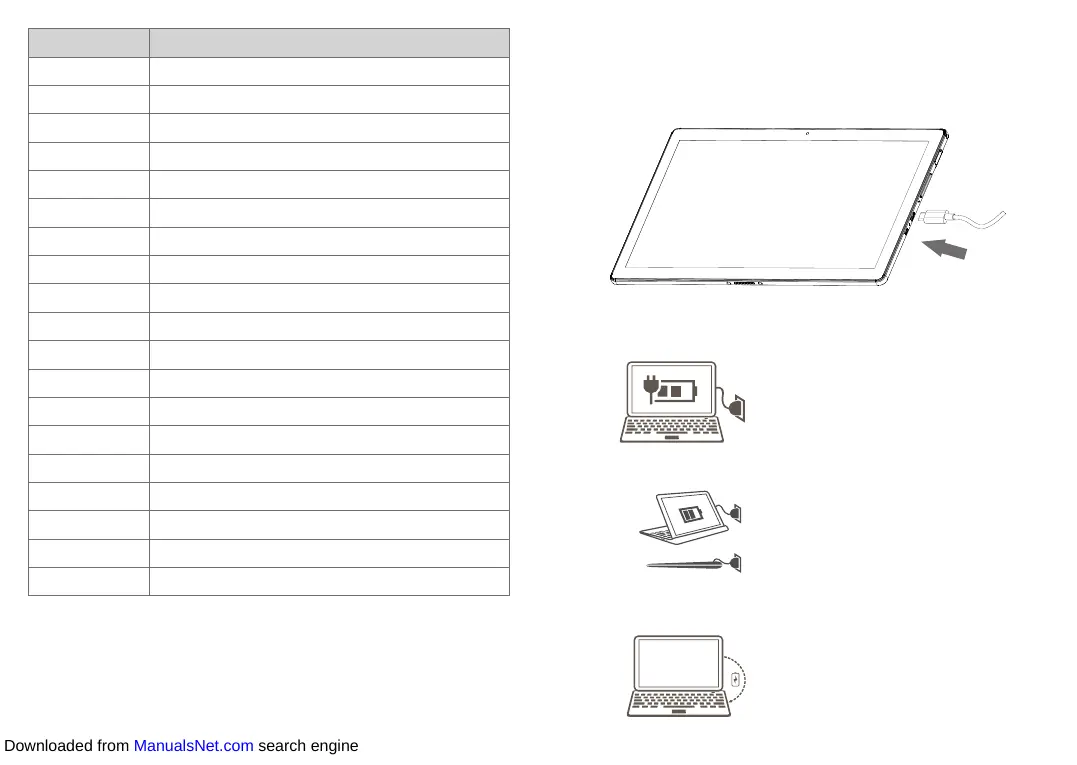
1.2 Charging the tablet
It is advisable to charge your tablet in preparation for its first use.
The USB Type-C port on your tablet can be used to charge the tablet
directly.
Note:
When the tablet is properly docked in the keyboard, you can use a
single charging cable to charge the tablet and keyboard at the same
time.
When the tablet is not properly docked or folded, the charging cable
charges only the tablet.
When the tablet is not being charged, docking it properly charges the
keyboard. If the tablet battery is over 10% and the keyboard battery is
lower than 10%, the keyboard will be charged to 15%.
Downloaded from ManualsNet.com search engine













 To Next Page