53 54
Flashes white
with 0.2s
intermittence
An SMS message received but not read
Constant
orange
3G/4G data service not available
Off Keyboard dormant or shut down
3.5 Connecting to a keyboard hotspot
The keyboard creates a hotspot for internet access after you insert
your 3G/4G SIM card. By connecting your tablet to the hotspot, you
can enjoy internet services, such as online chats, webpage browsing,
videos, games, etc.
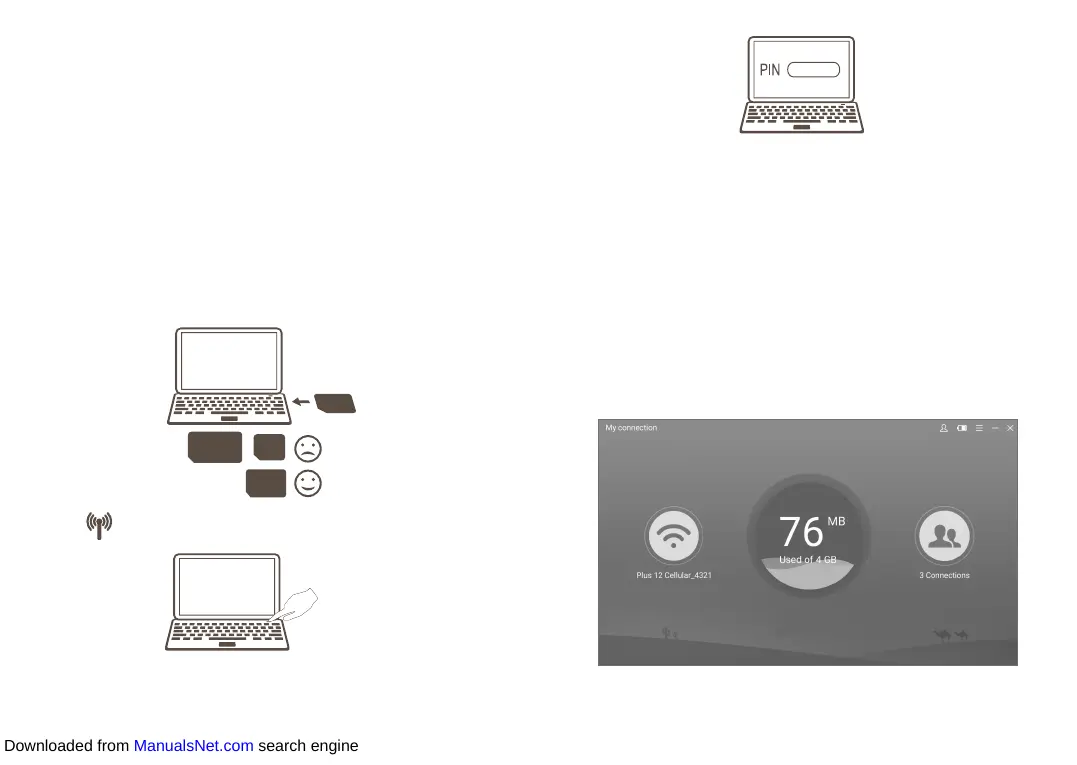
• Insert a 3G/4G SIM card in the keyboard slot.
Full-size SIM
Nano
SIM
Micro SIM
• Press to start up the keyboard.
Full-size SIM
Nano
SIM
Micro SIM
• Enter the PIN code
(1)
of your SIM card.
(1) The PIN code may not be required in some countries.
Full-size SIM
Nano
SIM
Micro SIM
• Once connected, the data indicator on the keyboard will turn on
constant white.
3.6 Keyboard setup
After your tablet is connected to the keyboard hotspot, you can set up
your keyboard using the My Connection application.
• Double-click the My Connection icon on the desktop.
• On the page that appears, enter the default password "admin" to
log in.
• From here you can alter settings for your SIM card, data usage, SMS,
online updates, and other keyboard features.
Downloaded from ManualsNet.com search engine













 To Next Page