27 28
Duplicate
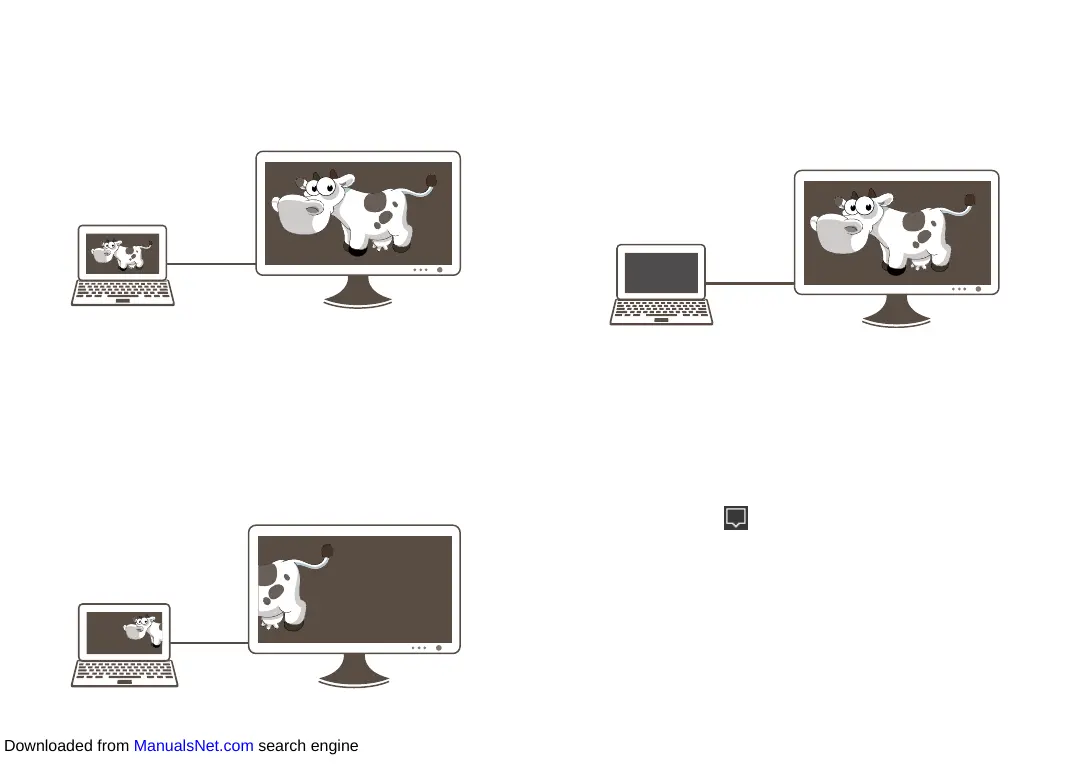
In this mode, the tablet screen is synchronized to the display screen.
Operations on the tablet will be reflected on the display device in real
time. You can use this mode for full presentation of contents in your
tablet.
HDMI
Extend
In this mode, you can share an object to the display screen by dragging
it to the left edge of your tablet screen. Upon its full appearance on the
display screen, you can perform further operations on the object. This
mode allows you to share only the desired objects so as to be more
protective of your privacy.
The dragging and operations on the display screen take effect only
with a mouse or the keyboard touchpad.
HDMI
Second screen only
In this mode, the tablet screen turns off while its contents appear on
the display screen. Upon initial switchover, you can touch Revert or
wait 10 seconds to exit, or stay in this mode as long as you desire. It
is advisable to use the keyboard or a mouse to perform operations on
the display screen.
HDMI
1.6.2 Project wirelessly
You may sometimes find your HDMI is not long enough or have
other restrictions. In this case, to project wirelessly would be an ideal
solution.
• Use an HDMI cable to connect a Wi-Fi display receiver to the
display device.
• Select Action center in the taskbar, and touch Project > Connect
to a wireless display.
• After the Wi-Fi display receiver is searched out, touch for connection.
Then the preceding projection modes will be available for selection.
Downloaded from ManualsNet.com search engine













 To Next Page