
 Need help?
Do you have a question about the Alcor SENTINELplus and is the answer not in the manual?
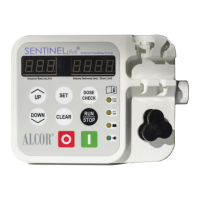
Bright LED display allows simultaneous viewing of infusion rate and volume delivered.
Pump operating history retained until manually erased, even after power loss.
Technical details including mechanism, operating range, dose limit, accuracy, battery, dimensions, weight.
Steps to reset the delivered volume to 0 using CLEAR.
Procedure to reset the dose limit to 0 using SET and CLEAR.
How to reset total accumulated volume to 0 using DOSE CHECK and CLEAR.
Process to clear volume, dose limit, and reset infusion rate to 5.
Indicates when the dose limit is reached, with beeps and flashing.
Alerts for empty container, occlusion, or pump inactivity.
Shows battery status; flashes and alarms when low.
Signals when flow rate exceeds limits, with FLO FAST text and beeps.
Steps to reset the delivered volume to 0.
Procedure to reset total accumulated volume to 0.
Steps to reset the dose limit to 0.
How to reset volume, dose limit, and infusion rate to 5.
 General
| Brand | Alcor |
|---|---|
| Model | SENTINELplus |
| Category | Water Pump |
| Language | English |

 To Next Page