53
EN
5.3. Settings
5.3.1. Setting the language
By default, the interface’s language is the French. To change to English, please, follow the instructions below.
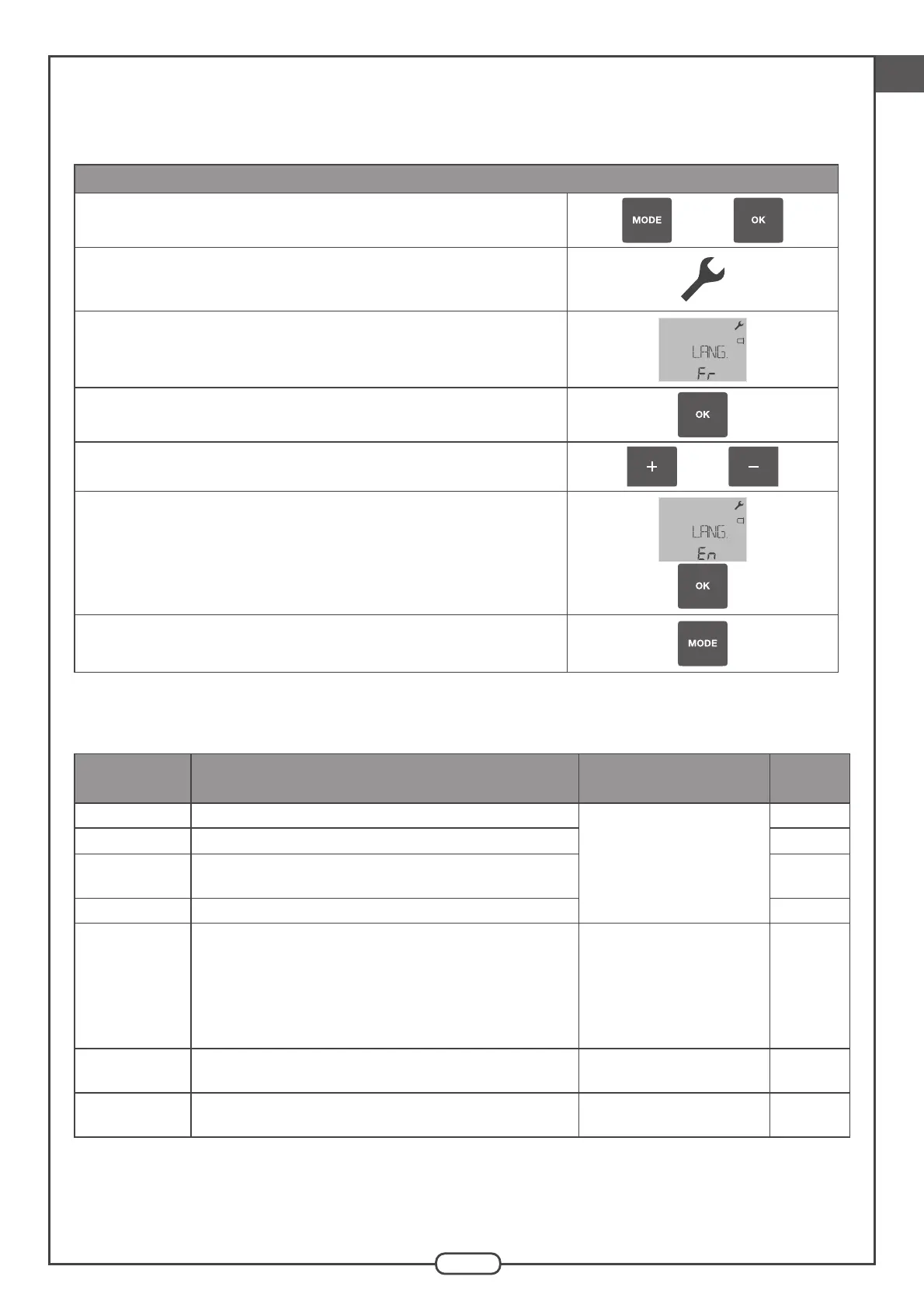
LANGUAGE Menu
Press and hold the "MODE" and "OK" buttons simultaneously
very short time to enter the advanced menu."
and
A key (symbol of the "setting" menu) appears at the top right of the
LCD screen. It remains displayed all the time of presence in the
advanced menu and flashes on error.
Press "+" to display the menu "LANG. <> IDIOMA".
Filter
Press "OK" to validate the selection of the menu "LANG. <> IDIOMA".
Select the English language (EN) with the "+" or "-" button.
or
Confirm with the "OK" button. The interface now displays all menus and settings
in English.
Filter
Pressing the "MODE" button returns to the advanced menu selection screen.
5.3.2. Parameters to be set to match the configuration of the dwelling
The following parameters should be set:
Parameter Description Possible values
Factory
settings
BATH* Number of BATHROOM type exhaust grilles
From 0 to 3 for T.Flow
®
Nano and from 0 to 6 for
T.Flow
®
Hygro+
1
WC* Number of WC type exhaust grilles 1
CELLAR*
Number of CELLAR type exhaust grilles
(grilles installed in a cellar, laundry room or wash-up room).
0
BATHWC* Number of BATHROOMWC type exhaust grilles (common) 0
ANTI-LEGIO Anti-Legionella function (heats to 65°C once a week)
No = the product does not
carry out an anti-Legionella
heating operation.
Yes = the product will carry
out an anti-Legionella heating
operation.
No
RAPID <> RISE
T.Flow ® Hygro+
Heats the water in the tank faster Yes or No Yes
PA
T.Flow
®
Hygro+
Adjusts the pressure to optimise operation in installation with
significant pressure drops
110 to 130 Pa per increments
of 5 Pa
110
* Grilles connected to the water heater.
Note: If appropriate, the product will automatically detect the presence of a dual tariff (no configuration required).
The product adapts automatically to the types of grilles installed: humidity-controlled or self-balancing (no configuration
required).


 To Next Page