3
QUICKSTART GUIDE (ENGLISH)
1. Make sure all items listed in the Box Contents
are included.
2. READ SAFETY INSTRUCTION BOOKLET
BEFORE USING THE PRODUCT.
3. Place the product in an appropriate location
for operation.
4. Ensure high quality, shielded audio cables
are used away from sources of
electromagnetic interference.
CONNECTION DIAGRAM
Notes:
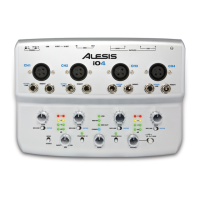
y When recording a guitar or bass with an active pickup, set the iO4 's MIC/LINE / GUITAR SWITCH to
"MIC/LINE." If your instrument uses a passive pickup, set the switch to "GUITAR."
y Plug the iO4 directly into your computer, and avoid using a USB hub. Hubs can interfere with the iO4 's
audio and MIDI timing signals.
y To reduce electrical hum at high gain settings, keep the iO4 's power supply away from your guitar cable
and the iO4 's channel inputs.
Before turning on the iO4's power, do the following:
1. Ensure all cable connections have been made correctly.
2. Ensure the volume controls for your amplifier or speakers are turned down.
3. Insert the Power jack into the [POWER] input on the rear panel of the iO4 and plug the power adapter into
an AC outlet.
4. Then power-up the iO4.
5. Turn on the power of your amplifier or speakers, and adjust the Gain and Main volume controls on the
iO4.
BOX CONTENTS
y iO4
y Power adapter
y USB cable
y Software DVD
y Quickstart Guide
y Safety Instructions & Warranty Information booklet
HEADPHONE
MICROPHONE
COMPUTER
SAMPLER
GUITAR
SPEAKERS


 To Next Page