5
REAR PANEL FEATURES
19
20
21
22
23
24
26
20
25
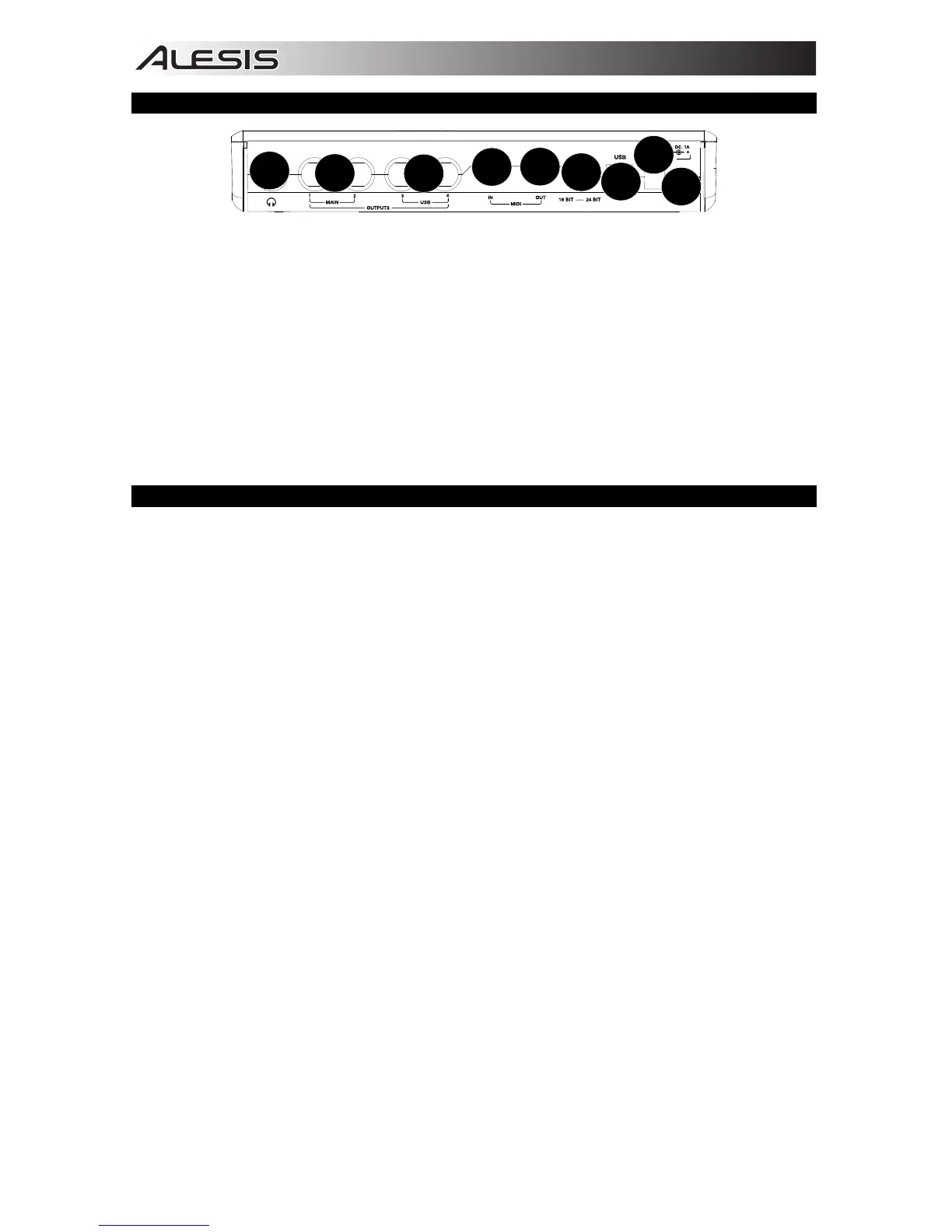
19. HEADPHONES – Connect your 1/4" headphones to this output.
20. OUTPUTS – Use standard 1/4" cables to connect these outputs to a mixer, speakers, or an amplifier
system. The level of these outputs is controlled by the MAIN VOLUME knob.
21. MIDI OUT – Use a standard five-pin MIDI cable to connect this output to the MIDI IN of an external
MIDI device.
22. MIDI IN – Use a standard five-pin MIDI cable to connect this input to the MIDI OUT of an external MIDI
device.
23. 16/24 BIT MODE – When the switch is set to 24 bit, you can use inputs 1-2 and outputs 1-2. When the
switch is set to 16 bit, you can use channel inputs 1-4 and outputs 1-4.
24. USB PORT – Use the included USB cable to connect the iO4 to a computer. iO4 requires a USB 2.0
connection. Note that the iO4 is not USB bus powered.
25. POWER CONNECTOR – Plug the included AC adapter here (6v DC 1A)
26. POWER SWITCH – Turns the iO4's on/off.
SYSTEM REQUIREMENTS
Minimum PC Requirements:
• Pentium III 450 MHz Processor
• 512 MB RAM
• Available USB 2.0 Port
• Windows XP (with Service Pack 2 installed)
Recommended PC Requirements:
• Pentium 4 or Athlon Processor
• 2GB or more RAM
• 7,200 RPM Hard Disk Drive
• Available USB 2.0 Port
• Windows XP, (with Service Pack 2 installed),
Vista, 7
Minimum Macintosh Requirements:
• Apple computer with native USB 2.0 support
• Mac OS X 10.5 or later
• 512 MB RAM
Recommended Macintosh Requirements:
• Mac computer with an Intel Core 2 Duo, Core
i3, Core i5, Core i7, or Xeon processor
• 7,200 RPM Hard Disk Drive
• 2GB of memory
• OS X v10.6.6 or later


 To Next Page