54
Altering the buttonhole width
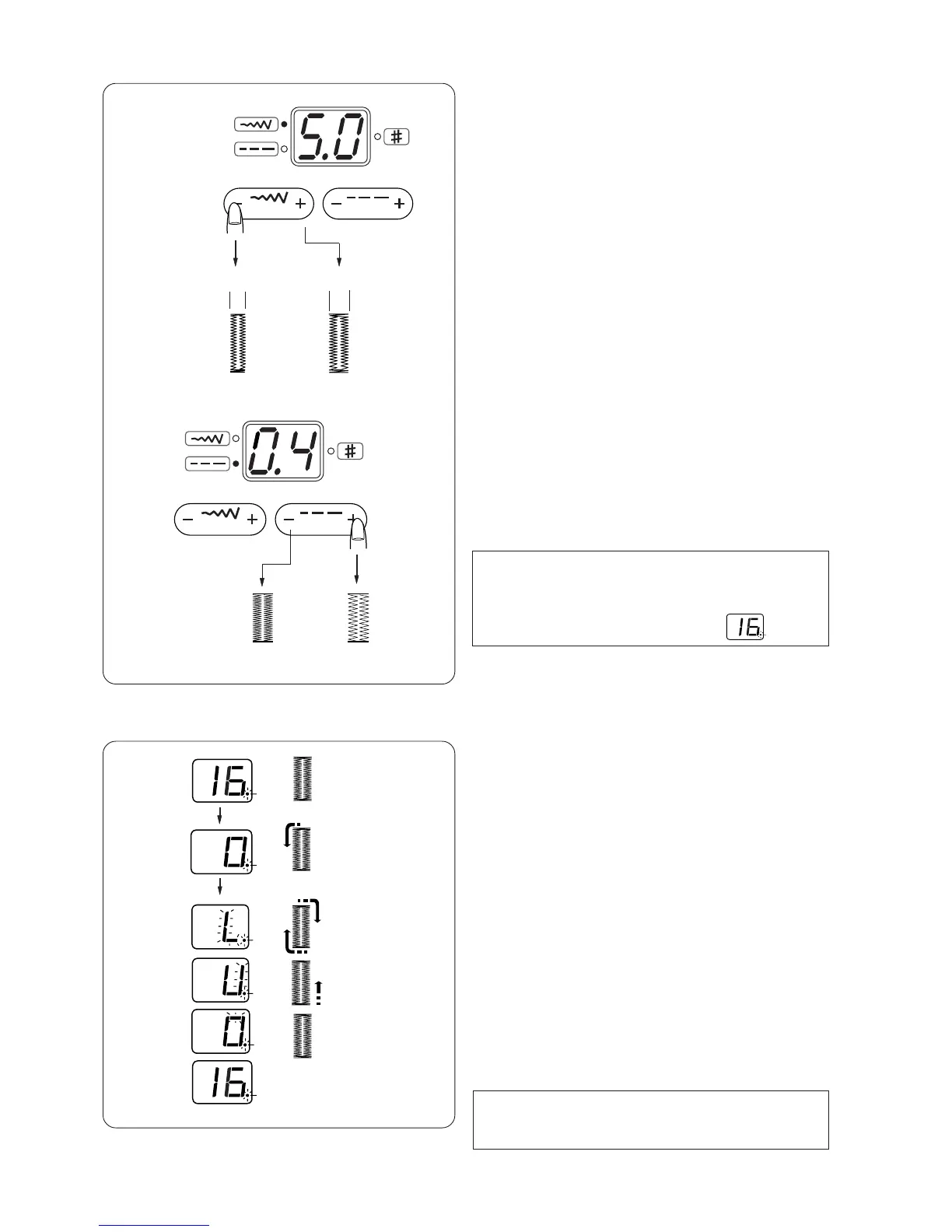
Press the stitch width adjusting button to change the
buttonhole width.
Press the "+" sign to increase the buttonhole width.
Press the "–" sign to decrease the buttonhole width.
q Narrower buttonhole
w Wider buttonhole
* The width can be altered between 2.5 and 5.0.
Altering the buttonhole stitch density
Press the stitch length adjusting button to change the
buttonhole stitch density.
Press the "+" sign to make the stitches sparser.
Press the "–" sign to make the stitches denser.
* The stitch density can be altered between 0.2 and
0.8.
NOTE:
The indicator shows the stitch width or density while
sewing. When the buttonhole is completed, the
indicator will show the pattern number .
Double layer buttonhole
To make a solid and sturdy buttonhole, sew another
layer of buttonhole over the previous stitches.
After the buttonhole is finished, simply start the
machine again.
Do not raise the foot or buttonhole lever.
The machine will sew another buttonhole in the
following order and stop automatically when it is
completed:
Step 1: Straight stitching in reverse to go back to the
starting point
Step 2: Front bartack and left row, then straight
stitching in reverse to go back to the
starting point
Step 3: Right row
Step 4: Back bartack and locking stitches at the end
The machine will stop automatically.
NOTE:
A double layer buttonhole can be sewn when the dot
is blinking.
Step 1
Step 2
Step 3
Step 4
q
w


 To Next Page