Need help?
Do you have a question about the Algo 8198 and is the answer not in the manual?
Proper mounting procedures to prevent injury and ensure secure installation.
Guidelines for testing and ensuring operational readiness for emergency notifications.
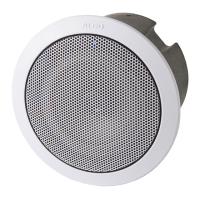
Introduces the 8198 SIP Ceiling Speaker, its capabilities, and ideal environments.
Lists items packaged with the speaker and optional accessories.
Step-by-step guide for initial setup and functional testing of the speaker.
Confirms compliance with UL2043 standards for air handling spaces.
Instructions for securely suspending the speaker from ceilings or trusses.
Explains how to connect the speaker's network and other required wiring.
Describes connecting external input devices like switches to the speaker.
Explains how to perform a factory reset on the speaker unit.
Outlines how to configure the speaker via web interface or provisioning.
Details SIP paging for single units, including satellite options.
Explains how to configure the speaker to play audio files for ring events.
Provides an overview of multicast capabilities for large-scale notification.
Describes multicast paging for multiple Algo SIP endpoints.
Details paging multiple speakers using individual SIP extensions.
Explains how to trigger alerts for emergency, safety, or other announcements.
Describes streaming background music using the 8301 Paging Adapter.
Explains support for Polycom Group Paging for simultaneous audio.
Discusses the use of TLS for secure SIP signaling and provisioning.
Steps for installing public CA certificates for secure communication.
Secures provisioning by using HTTPS for configuration file downloads.
Explains securing SIP signaling and RTP audio using TLS and SRTP.
Configures SRTP for encrypting RTP voice data for secure calls.
Settings for Media NAT, TURN Server, and TURN User.
Details how to log into the device's web interface using default credentials.
Configuration section for SIP server information and account credentials.
Configuration for adding a second SIP extension for ring events.
Defines the SIP extension for voice paging and auto-answer.
Settings for events triggered by Ring Extension(s) and Emergency Alerts.
Settings for page volume, mode, timeout, and tone.
Configuration for ambient noise compensation and automatic gain control.
Sets speaker volume for SIP ring events and a time limit for ringing.
Controls speaker page volume and options for one-way, two-way, or delayed paging.
Defines IP address ranges and default multicast IP for the speaker.
Lists the nine basic multicast zones and their priority hierarchy.
Configuration for master role in multicast, including output codec and packetization.
Zone selection mode and playback zones for master multicast configuration.
Option to select basic/expanded zones and multicast protocol type.
Configures Polycom group selection and zone selection methods.
How to page zones using DTMF codes when 'DTMF Selectable Zone' is active.
Using speed dial keys for direct zone selection without DTMF.
Defines master single zone and playback zones for multicast.
Configures the speaker to receive Polycom group paging.
Settings for Polycom groups and channels when used as a slave.
Selects multicast zones for the 8198 to monitor as a slave.
Configures the speaker's input/output actions for triggered events.
Configures how the input relay is activated by switches and supervision.
Details supported input devices like Call Switches and Volume Controls.
Configures the speaker to play a tone or pre-recorded announcement.
Sets up the speaker to initiate a two-way conversation.
Configures the speaker to make a private call with a pre-recorded message.
Defines actions when the device is offline or tampered with.
Configures tone duration, intervals, call limits, and ringback tones.
Controls the output light and heartbeat indicator status.
Configures announcement duration, maximum time, and inbound call handling.
Sets up an extension to cancel active emergency announcements.
Configures up to 10 different announcements with extensions and credentials.
Registers dedicated extensions for basic paging zones.
Registers dedicated extensions for expanded paging zones.
Registers additional extensions for loud ringing alerts with unique tones.
Configures network settings like IP addressing, VLAN, and DSCP values.
Sets IP protocol method, VLAN mode, ID, and priority.
Manages admin password, device name, and interface settings.
Configures log level and method for system event logging.
Sets session timeout and configures startup tone behavior.
Controls visibility of switch port ID on the status page when logged out.
Settings for web interface protocol, password strength, and SIP passwords.
Configuration for SNMP, API, and System Integrity checking.
Stores SIP passwords securely in an encrypted format.
Enables Syn-Apps Revolution paging application for multicast streams.
Configures timezone, NTP servers, and device date/time.
Configures how the device obtains its settings and firmware.
Settings for dynamic range compression and jitter buffer.
Applies filters to speaker and microphone inputs/outputs.
Ensures audio packets are sent at all times, even in one-way paging.
General SIP settings including transportation, scheme, and server validation.
Configures SRTP for secure calls and outbound proxy settings.
Configures primary and backup SIP servers for failover.
Settings for keep-alive methods and header handling.
Configures a second backup SIP server and polling intervals.
Configures master output codec, packetization time, and RTCP port.
Defines IP addresses and ports for multicast zones.
Synchronizes audio on the 8198 with other devices in multicast slave mode.
Specifies master output codec and audio packetization time.
Configures page tones and volumes for slave zones.
Manages backup, restore, and reboot functions for the device.
Displays current installed firmware versions for the product.
Checks for and performs online or custom firmware updates.
Instructions for uploading custom WAV or MP3 audio files for notifications.
Lists pre-loaded audio files available for selection and management.
Information on uploading certificate files for secure communication.
Allows downloading of system log files for troubleshooting.
 General
| Speaker type | 2-way |
|---|---|
| Speaker placement | Ceiling-mountable |
| Built-in amplifier | Yes |
| Number of speakers | 1 |
| Audio formats supported | G.711 μ-law, G.722, G.711 A-law |
| Power source type | PoE |
| Power consumption (standby) | 2.5 W |
| Sensitivity | 88 dB |
| RMS rated power | 16 W |
| Product color | White |
| Built-in display | No |
| Suitable for outdoor use | - |
| Quantity per pack | 1 pc(s) |
| Connectivity technology | Wired |
 Weight and Dimensions
| Width | 205 mm |
|---|---|
| Weight | 2700 g |
| Driver diameter | 165 mm |

 To Next Page