Table 7. System setup options—Boot menu
Boot
File Browser Del Boot Option Allows you to delete the boot path in the boot option list.
Enable USB Boot Support Allows you to enable or disable the USB Boot control.
Boot Option Priorities
Displays the available boot devices.
Boot Option #1 Displays the first boot device. Default: UEFI: Windows Boot
Manager.
Boot Option #2
Displays the second boot device. Default: Onboard NIC
Device.
Boot Option #3
Displays the third boot device. Default: Onboard NIC
Device.
Table 8. System setup options—Exit menu
Save & Exit
Save Changes and Reset Allows you to exit system setup and save your changes.
Discard Changes and Reset Allows you to exit system setup and load previous values for
all system setup options.
Restore Defaults Allows you to load default values for all system setup
options.
Discard Changes Allows you to exit your changes.
Save Changes Allows you to save your changes.
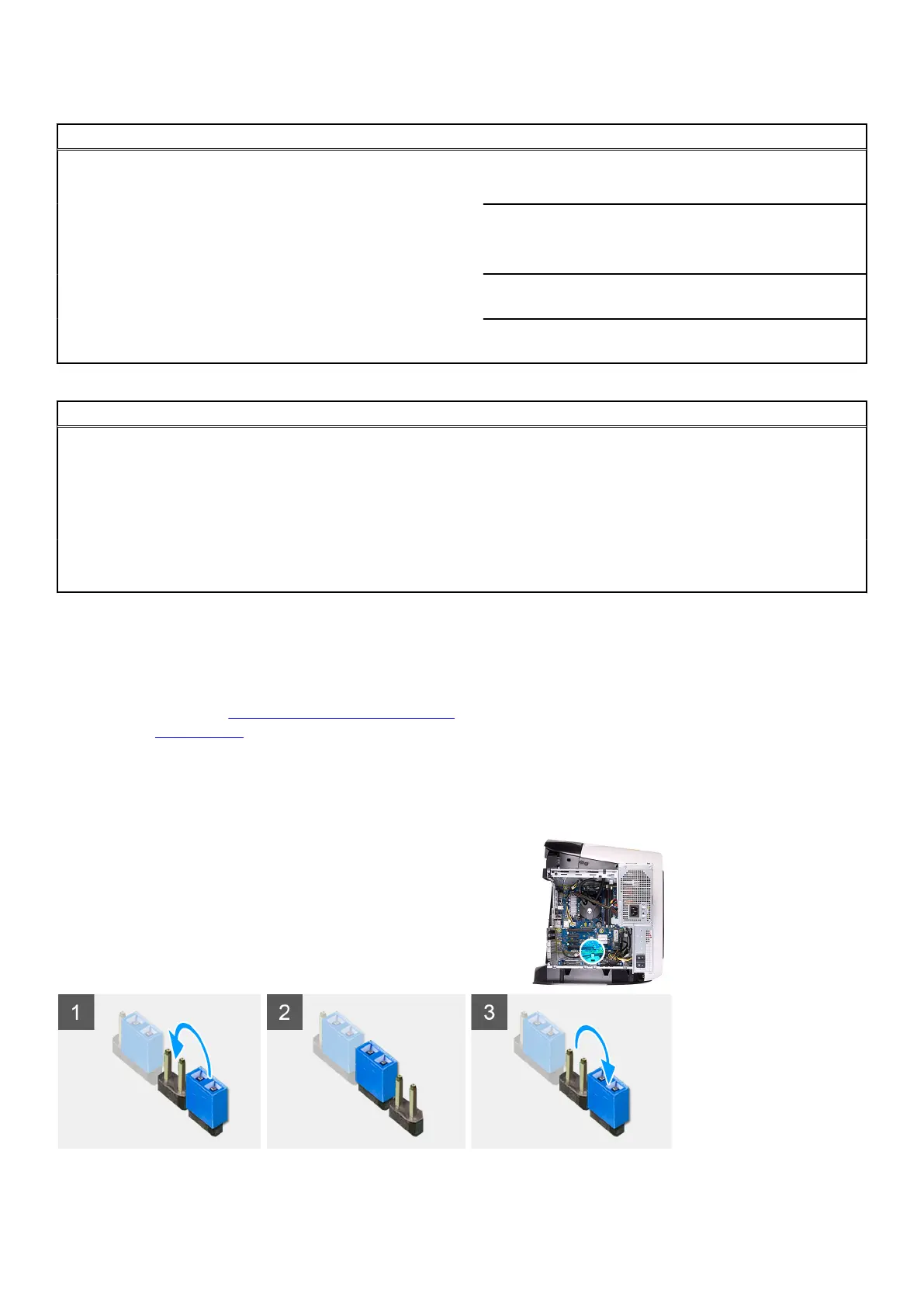
Clearing CMOS settings
Prerequisites
1. Follow the procedure in
Before working inside your computer.
2. Remove the
left-side cover.
About this task
The following images indicate the location of the CMOS jumper and provide a visual representation of the clearing CMOS
procedure.
100















 To Next Page