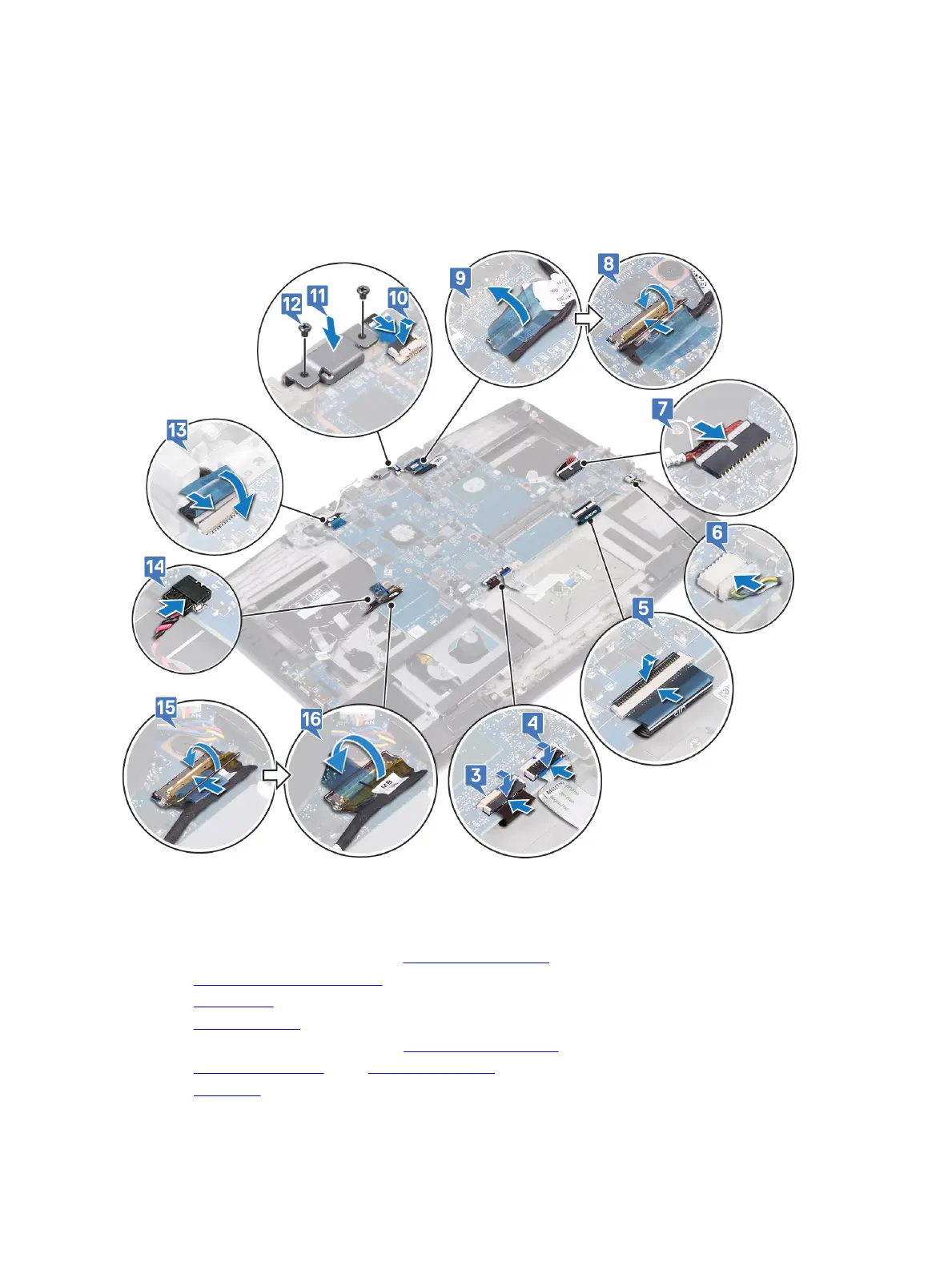
10 Connect the power-button board cable to the system board.
11 Place and align the USB Type-C port bracket on the palm-rest assembly.
12 Replace the two screws (M2x3) that secure the USB Type-C port bracket to the palm-rest assembly.
13 Connect the camera cable to the system board and adhere the tape that secures the camera cable to the system board.
14 Connect the coin-cell battery to the system board.
15 Connect the I/O-board cable to the system board and close the latch to secure the cable.
16 Adhere the tape that secures the I/O-board cable connector latch to the system board.
Post-requisites
1 Follow the procedure from step 2 to step 6 in Replacing the heat sink.
2 Replace the solid-state drive/Intel Optane.
3 Replace the wireless card.
4 Replace the memory modules.
5 Follow the procedure from step 4 to step 6 in Replacing the hard drive.
6 Replace the battery (half-length) or the battery (full-length), whichever applicable.
7 Replace the base cover.
85



 To Next Page