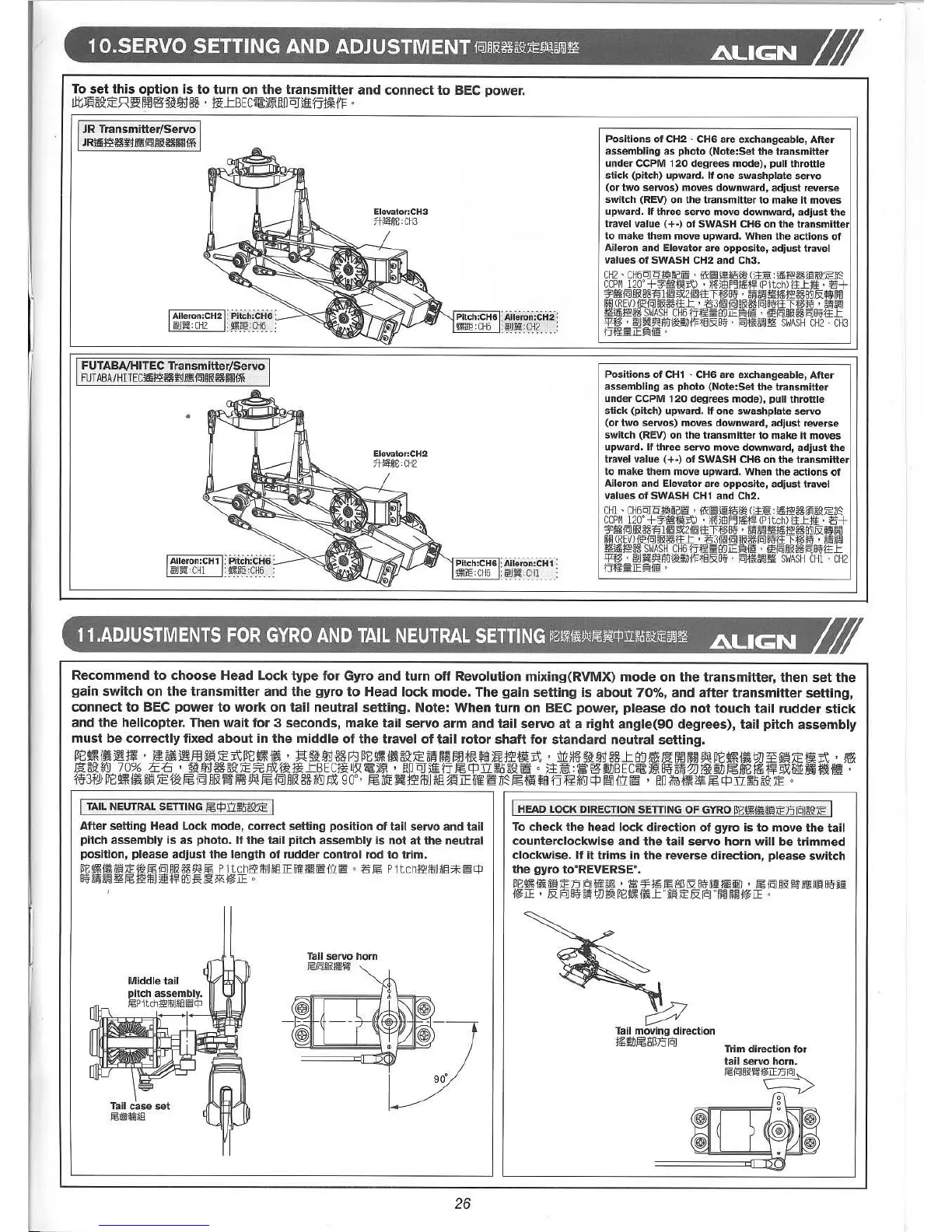
To set this option is to turn on the transmitter and connect to BEC power,
J1tm~AE~~~@:'5~!i}j36' Mt.tBEC~)~I'!ODJ~fjt~HF
0
JRTransmitter/Servo
JR~~~~iIf<i~~Ii(~rmi*
FUTABAjHITECTransmitter/Servo
FUTABA/HlTEC~~~~iIf<i~~Ii(~rmi*
•
Positions of CH2 ' CH6 are exchangeable, After
assembling as photo (Note:Set the transmitter
under CCPM 120 degrees mode), pull throttle
stick (pitch) upward. If one swash plate servo
(or two servos) moves downward, adjust reverse
switch (REV) on the transmitter to make it moves
upward. If three servo move downward, adjust the
travel value (+-) of SWASH CH6 on the transmitter
to make them move upward. When the actions of
Aileron and Elevator are opposite, adjust travel
values of SWASH CH2 and Ch3.
CH2' CH6crr.9:!fi!~Gi!!j· iiX~itFom()1~:j!§j'i!~ji'j5£~1FO'
CCPM120' +'f'lIt1J1]:t) • ~)ElJF~jIH.!j!(Pitch) jlLm; . '15+
'f'1I{Q]i&~~li~9.X:2i~ttH§8;j'· Bi'J~!\'H1Ej'i!~ffiJ&J5~
~m(REV)i~iq]i&~ttL . '1531~{Q]i&~[OJ8;j'ttTf§8;j' • Bi'J~
'!I[j!§j'i!~ SWASHCH6jjf1ffiffiJIE~ii§! . i~{Q]i&~[OJ8;j'11L
:;:P:f§. ijiU~~mrmm1Ji'Ft§&8;j' . [OJt~~'!I[ SWASHCH2' CH3
jjf1ffiIE~ ii§!•
Positions of CH1 ' CH6 are exchangeable, After
assembling as photo (Note:Set the transmitter
under CCPM 120 degrees mode), pull throttle
stick (pitch) upward. If one swashplate servo
(or two servos) moves downward, adjust reverse
switch (REV) on the transmitter to make it moves
upward. If three servo move downward, adjust the
travel value (+-) of SWASH CH6 on the transmitter
to make them move upward. When the actions of
Aileron and Elevator are opposite, adjust travel
values of SWASH CH1 and Ch2.
CHI ' CH6crr.9:!fi!~Gi!!j• {iX~it*j§m ()1~ :j!§j'i!~ji'j5£~1FO'
CCPM120' +'f'lIt1J1]:t) . ~~)ElJF~j1Et.!j!(Pitch)
ilLm; . '15+
'f'1I{Q]i& ~~1 i~9.X:21[Q]ttTf§8;j' . Bi'J~'!I[I1Ej'i!~ffiJ&!I5~
f#J (REV)«E{q]i&~ilL . '153i[Q]{q]i&~[OJ8;j'jlTf§8;j' . ~~
'!I[j!§j'i!~ SWASHCH6jjf1ffiffiJIE~Ii§! • «E{Q]i&~[OJ8;j'ttL
:;:P:f§. ijiU~~mrmm1JfFt§&8;j' , [OJ~~'!I[ SWASHCHI' CH2
jjf1f
Recommend to choose Head Lock type for Gyro and turn off Revolution mixing(RVMX) mode on the transmitter, then set the
gain switch on the transmitter and the gyro to Head lock mode. The gain setting is about 70%, and after transmitter setting,
connect to BEC power to work on tail neutral setting. Note: When turn on BEC power, please do not touch tail rudder stick
and the helicopter, Then wait for 3 seconds, make tail servo arm and tail servo at a right angle(90 degrees), tail pitch assembly
must be correctly fixed about in the middle of the travel of tail rotor shaft for standard neutral setting.
~ •• R.'~.Rm.AErt~ •• '~~~36~~ •• ~AE~H~m~~~mrt'~~~~36~~.~~HW~ •• ~~.AEmrt,.
~~,jQJ 70% ;£E ' ~Uj36~AE7¥:,6jH~m~BEc:!~~9:~)~' I'!ODJ~fjl'§c:jJ:UJ!,Q~9:~
0 ).=E~:~@:iDBEC~)~8iJ~~~t~U1Jl'§ffi8mit'i'!JX:@:fifli~U!'
m3~~ ••• AE.I'§~~.~W~~~36,jQJ~g~,I'§~.~~m~~~~~I'§.~B~,jQJc:jJ~m~'~~E~I'§c:jJrr~~AEo
I TAILNEUTRALSETTING f;§C/::ru1!\JB9:~I
After setting Head Lock mode, correct setting position of tail servo and tail
pitch assembly is as photo. If the tail pitch assembly is not at the neutral
position, please adjust the length of rudder control rod to trim,
~t:~ ii~!'j ~ ~ f;§{QI iIJZ ~ We f;§ P itchjg<;ifJU *ELiHi J1i~ irr ~ 0 :gf;§ P itchjg<;1M *El*~C/C
8~~~
mJ ~ f;§jg<;ifJH!!H1j18}] ~ mo~{~IE •
I HEAD LOCK DIRECTIONSETTING OF GYROm~~{iii!'j~D[ijB9:~ I
To check the head lock direction of gyro is to move the tail
counterclockwise and the tail servo horn will be trimmed
clockwise. If it trims in the reverse direction, please switch
the gyro to"REVERSE",
m~ •• ~D[ij.~'.~.f;§OO&~ •• E'~~~.iIf<E~.
i~IE ' &[ij8~~fj'Wj~Ht:~~iiJ::~!'j~&[ij"~rmi~IE'
Tail servo horn
jj§~i&mgM
26
~
Tail moving direction
.11J~OOD[ij
Trim direction for
tail servo horn.
~~i&Mi~:[Cj~
o
o



 To Next Page