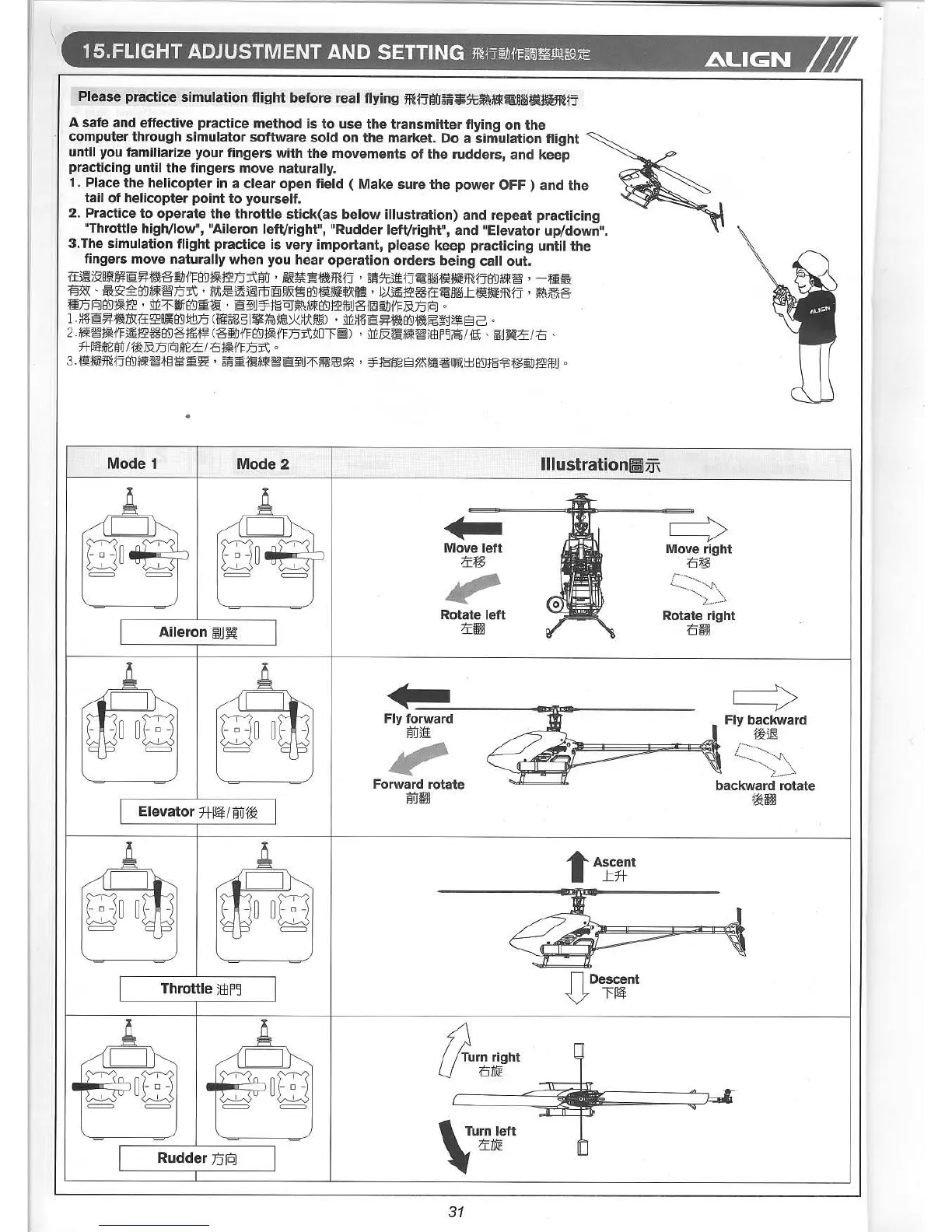
Please practice simulation flight before real flying m~jiW~~¥$7t~~~mlM~t~m~j
A safe and effective practice method is to use the transmitter flying on the
computer through simulator software sold on the market. Do a simulation flight
until you familiarize your fingers with the movements of the rudders, and keep
practicing until the fingers move naturally.
1. Place the helicopter in a clear open field ( Make sure the power OFF) and the
tail of helicopter pOint to yourself.
2. Practice to operate the throttle stick(as below illustration) and repeat practicing
"Throttle high/low", "Aileron left/right", "Rudder left/right", and "Elevator up/down".
3.The simulation flight practice is very important, please keep practicing until the
fingers move naturally when you hear operation orders being call out.
i:t~j~ijj!MrnJ:~~eIlJ11=8'D1*~n-Af'jU, ~~.~mrj , 8~$IG~1j~§~f~t!iiJ!m1j8'D*~W§', -tl:$
~31:\( ':$'ij~8'D*~W§'n-A' )j>vL~~~m[§j~JjZ~8'Df~t!iiJ!~e' tz~~36i:t~§~Lf~t!iiJ!m1j , ~~e
tln-fOJ8'D1*~' Mz1"!li8'Dm~' rnJ:?iW¥-J~~~*~8'D~ffiUei[Q]1lJ11=B.n-fOJ
0
1.~~rnJ:~~)])(i:t~81i8'DtiBn-(!ii8rg51~@~I~LkilA!m), Mz~~rnJ:~~8'D~jj§~~ElG0
U~~1*i1=~~368'Demt~ (eIlJ11=8'D1*11=n-A!ZDr:I~j), Mz&iJU~~jEBF~~/1t1:' ljjuW:::T:rtJ'
fI-~m8f'jU/~B.n-fOJm8::T:/tJ1*11=n-A
0
3·f:1,1;j!iiJ!mrj8'D*~~t§~m~' 8~mtJH*~rnJ:~U1"~JG\~' '¥-J~~~EI~I!Ji~o~tl:J8'DJ~~t~llJ~ffiU0
•
Mode 1
Mode 2
lIIustration!iJ:ffi
c==>
Move right
15t~
Rotate right
15l1j
•••
Move left
;]':t~
Rotate left
;]':iJJ
Aileron ~UH
c==>
~ Fly backward
J ~£:ill
~~~~~~~....g"~,,
-" - :aCkw ••d ••'ate
1£:ljj
..c
Fly forward
f'jUji
Forward rotate
iWiJJ
Elevator f-H~/M1£:
tAscent
Lft-
~~'i
Throttle )B3F~
Rudder 75[0]
n Descent
V l'~
, Turn left~ ;]':DJE
31



 To Next Page