Operation and Status
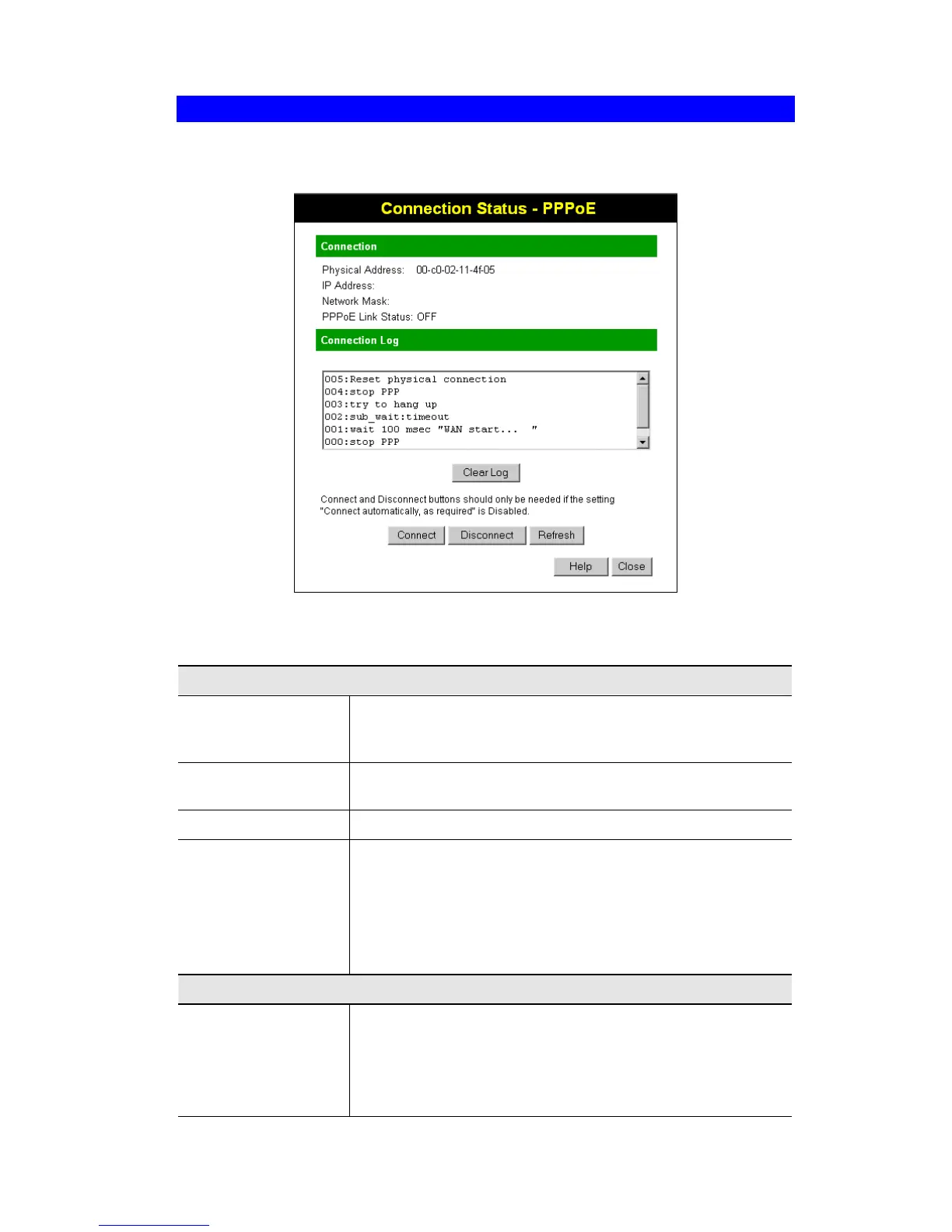
Connection Status - PPPoE
If using PPPoE (PPP over Ethernet), a screen like the following example will be displayed
when the "Connection Details" button is clicked.
Figure 24: PPPoE Status Screen
Data - PPPoE Screen
Connection
Physical Address
The hardware address of this device, as seen by remote devices
on the Internet. (This is different to the hardware address seen by
devices on the local LAN.)
IP Address
The IP Address of this device, as seen by Internet users. This
address is allocated by your ISP (Internet Service Provider).
Network Mask
The Network Mask associated with the IP Address above.
PPPoE Link Status
This indicates whether or not the connection is currently estab-
lished.
• If the connection does not exist, the "Connect" button can be
used to establish a connection.
• If the connection currently exists, the "Disconnect" button
can be used to break the connection.
Connection Log
Connection Log
• The Connection Log shows status messages relating to the
existing connection.
• The most common messages are listed in the table below.
• The "Clear Log" button will restart the Log, while the Re-
fresh button will update the messages shown on screen.
37



 To Next Page