Wireless Router User Guide
Physical Details
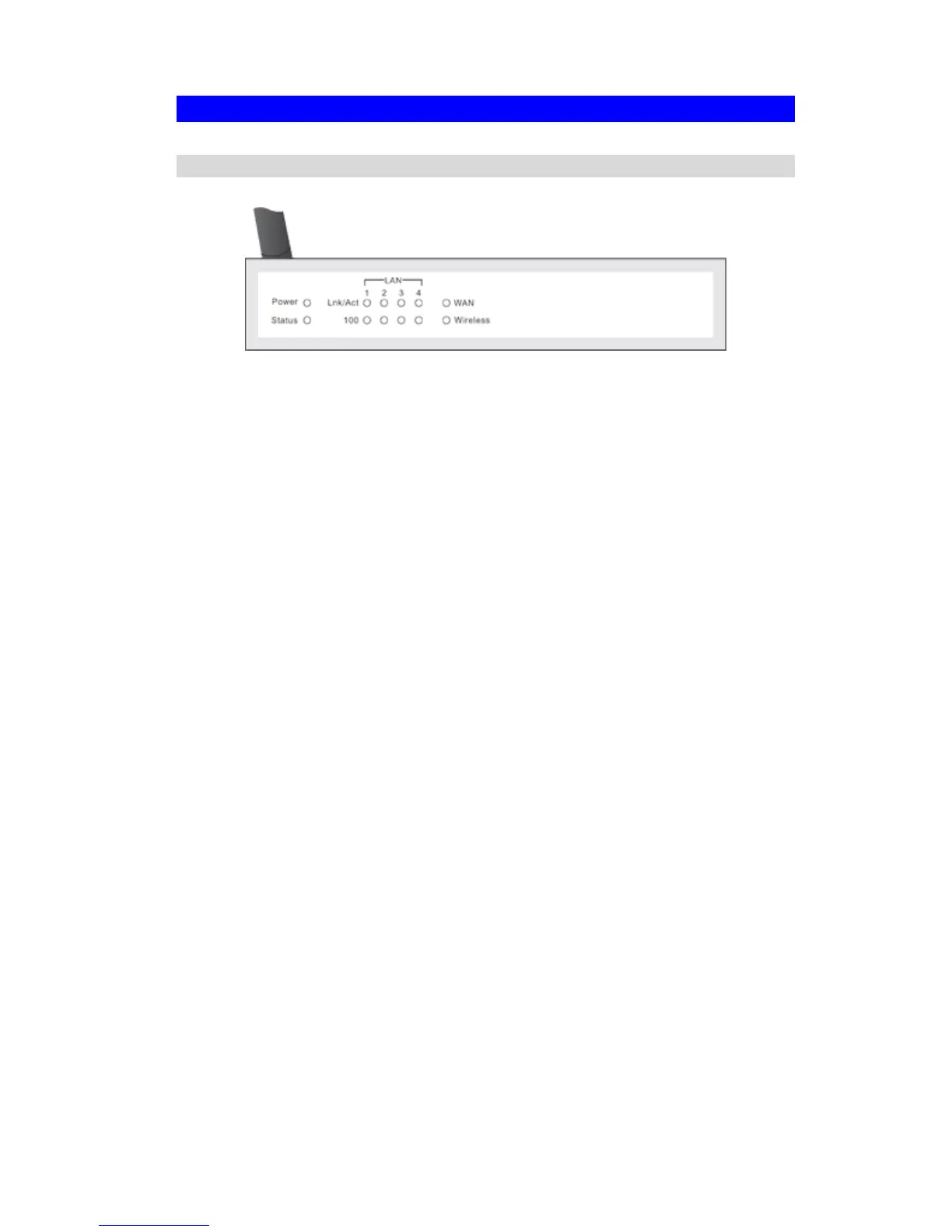
Front-mounted LEDs
Figure 2: Front Panel
Power LED On - Power on.
Off - No power.
Status (Red)
LED
On - Error condition.
Off - Normal operation.
Blinking - This LED blinks during start up, and during a Firmware Up-
grade.
LAN LEDs
For each port, there are 2 LEDs
• Link/Act
• On - Corresponding LAN (hub) port is active.
• Off - No active connection on the corresponding LAN (hub) port.
• Flashing - Data is being transmitted or received via the corre-
sponding LAN (hub) port.
• 100
• On - Corresponding LAN (hub) port is using 100BaseT.
• Off - Corresponding LAN (hub) port connection is using
10BaseT, or no active connection.
WAN LED On - Connection to the Broadband Modem attached to the WAN (Inter-
net) port is established.
Off - No connection to the Broadband Modem.
Flashing - Data is being transmitted or received via the WAN port.
Wireless LED On - Wireless connection available; Wireless Access Point is ready for
use.
Off - No Wireless connection available.
Flashing - Data is being transmitted or received via the Wireless access
point. Data includes "network traffic" as well as user data.
4



 To Next Page