Advanced Features
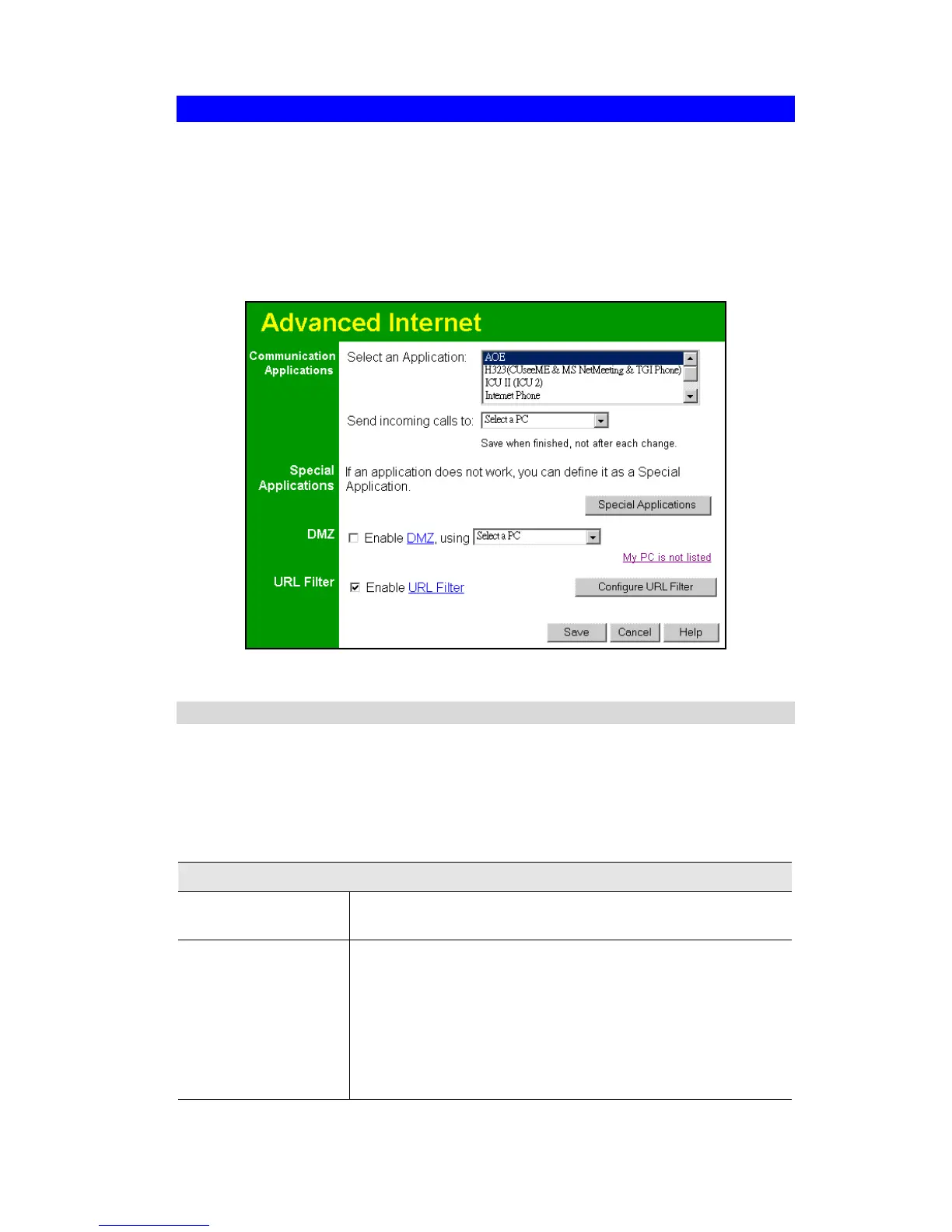
Advanced Internet Screen
This screen allows configuration of all advanced features relating to Internet access.
• Communication Applications
• Special Applications
• DMZ
• URL filter
An example screen is shown below.
Figure 30: Internet Screen
Communication Applications
Most applications are supported transparently by the Wireless Router. But sometimes it is not
clear which PC should receive an incoming connection. This problem could arise with the
Communication Applications listed on this screen.
If this problem arises, you can use this screen to set which PC should receive an incoming
connection, as described below.
Communication Applications
Select an Application
This lists applications which may generate incoming connections,
where the destination PC (on your local LAN) is unknown.
Send incoming calls to
This lists the PCs on your LAN.
• If necessary, you can add PCs manually, using the "PC
Database" option on the advanced menu.
• For each application listed above, you can choose a destina-
tion PC.
• There is no need to "Save" after each change; you can set the
destination PC for each application, then click "Save".
45



 To Next Page