Operation and Status
Connection Log
Connection Log
• The Connection Log shows status messages relating to the
existing connection.
• The Clear Log button will restart the Log, while the Refresh
button will update the messages shown on screen.
Buttons
Connect
If not connected, establish a connection to Telstra Big Pond.
Disconnect
If connected to Telstra Big Pond, terminate the connection.
Clear Log
Delete all data currently in the Log. This will make it easier to read
new messages.
Refresh
Update the data on screen.
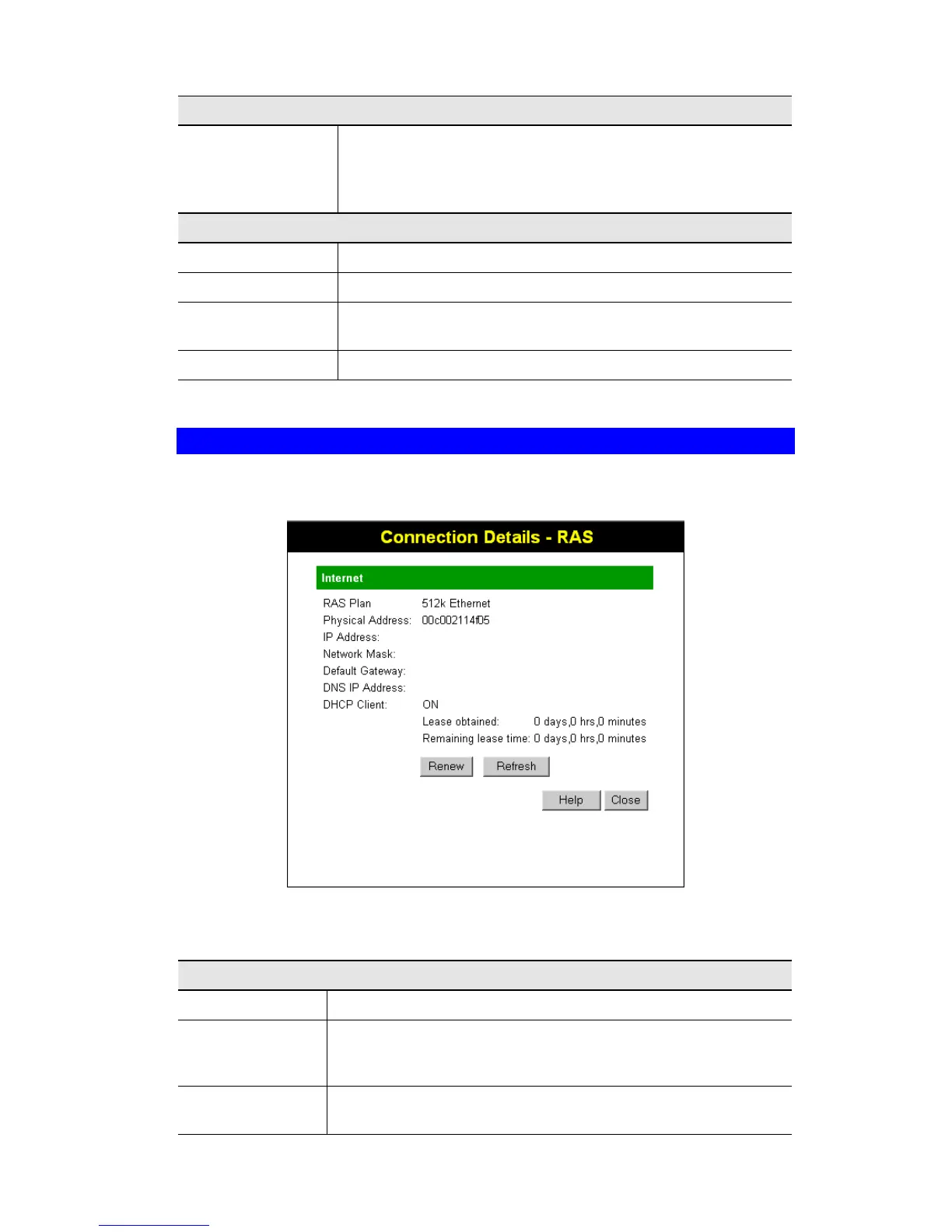
Connection Details - SingTel RAS
If using the SingTel RAS access method, a screen like the following example will be displayed
when the "Connection Details" button is clicked.
Figure 27: Connection Details - RAS
Data - RAS Screen
Internet
RAS Plan
The RAS Plan is currently used.
Physical Address
The hardware address of this device, as seen by remote devices on
the Internet. (This is different to the hardware address seen by
devices on the local LAN.)
IP Address
The IP Address of this device, as seen by Internet users. This address
is allocated by your ISP (Internet Service Provider).
41



 To Next Page