Wireless Router User Guide
URL Filter
The URL Filter allows you to block access to undesirable Web site
• To use this feature, you must define "filter strings". If the "filter string" appears in a
requested URL, the request is blocked.
• Enabling the URL Filter also affects the Internet Access Log. If Enabled, the "Destination"
field in the log will display the URL. Otherwise, it will display the IP Address.
• The URL Filter can be Enabled or Disabled on the Advanced Internet screen.
URL Filter Screen
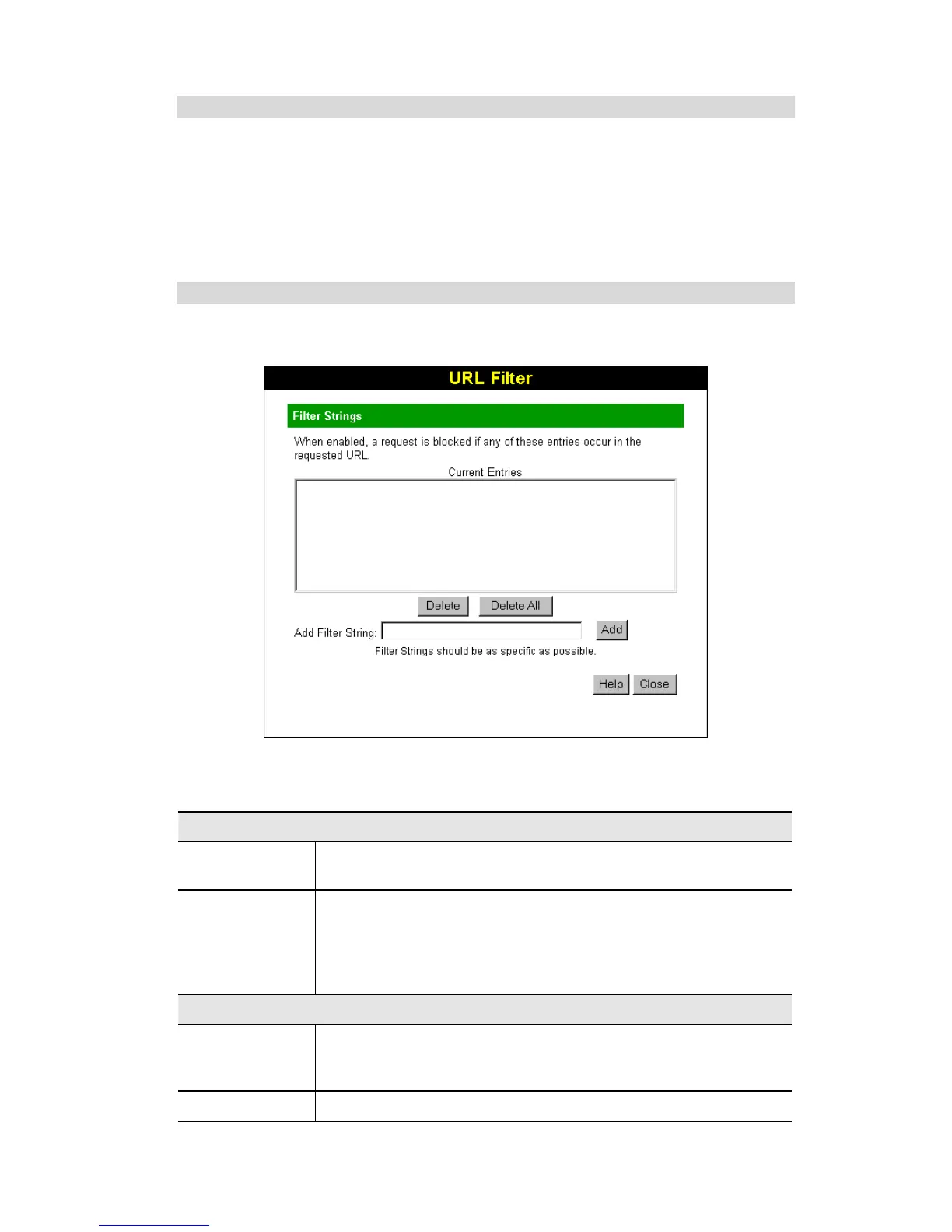
Click the "Configure URL Filter" button on the Internet screen to access the URL Filter screen.
An example screen is shown below.
Figure 32: URL Filter Screen
Data - URL Filter Screen
Filter Strings
Current Entries
This lists any existing entries. If you have not entered any values, this
list will be empty.
Add Filter String
To add an entry to the list, enter it here, and click the "Add" button.
An entry may be a Domain name (e.g. www.trash.com) or simply a
string. (e.g. ads/ )
Any URL which contains ANY entry ANYWHERE in the URL will
be blocked.
Buttons
Delete/Delete All
Use these buttons to delete the selected entry or all entries, as required.
Multiple entries can be selected by holding down the CTRL key while
selecting.(On the Macintosh, hold the SHIFT key while selecting.)
Add
Use this to add the current Filter String to the site list.
48



 To Next Page