Chapter 5 Parameter Introductions
http://www.acdrive-china.com
150
%
Min analog
value (V)
Max analog
value (V)
Ph ysical value
corresponding to Min
analog value Input
%
Physical value
corresponding to Max
analog value Input
%
%
Min analog
value (V)
Max analog
value (V)
Physical value
corresponding to Min
analog value Input
%
Physical value
corresponding to Max
analog value Input
%
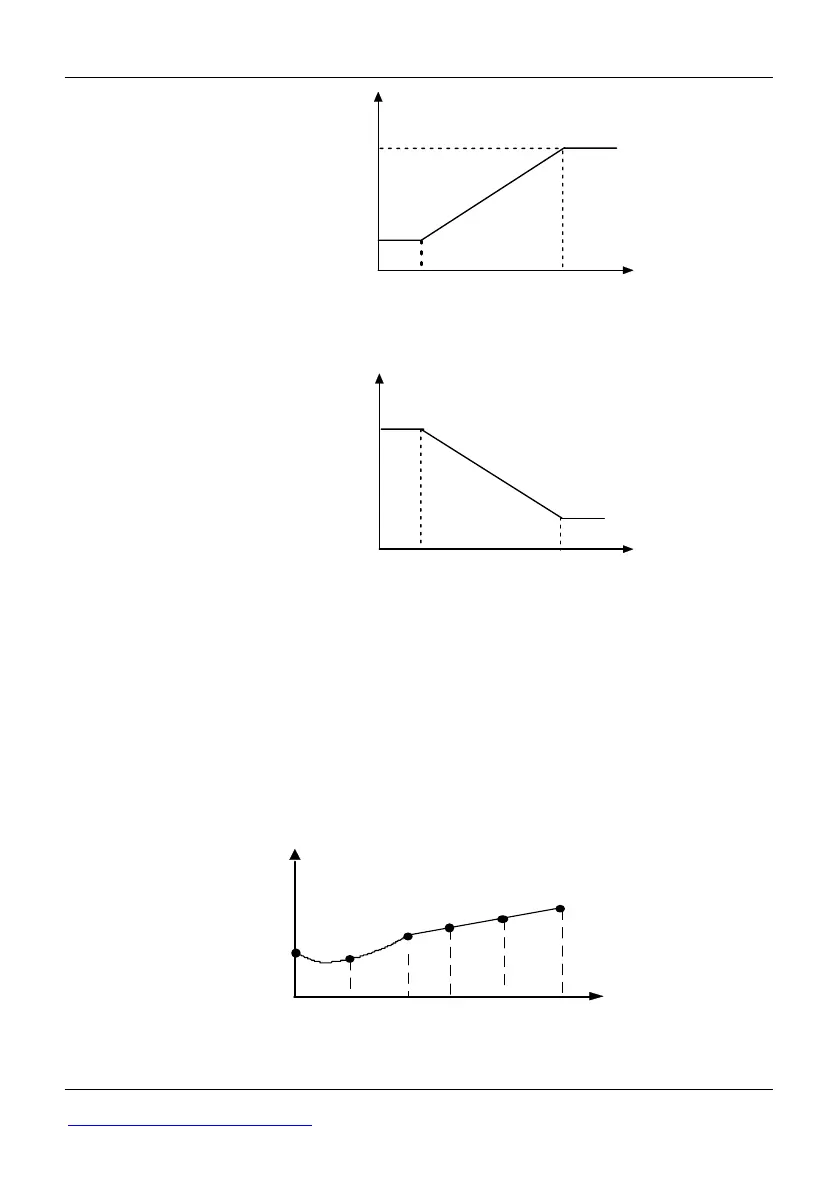
Fig. 5-4-1 Analog input linear curve
Note 2:
◆When P4.00 is set to 1, 2, or 3, the function of P4.01~P4.04, P4.06~P4.09 and
P4.11~P4.14 are combined for one physical value, which is different to Note 1. User
can define their own nonlinear curves by setting these parameters. Six points can be
set on the curve. As shown in Fig. 5-4-2. In addition, the setting value to P4.01, P4.03,
P4.06, P4.08, P4.11, P4.13 must increase in order.
Physical value corresponding to
analog value Input%
P4.08P4.03
P4.13
P4.01
P4.11P4.06
Analog
input
P4.02
P4.04
P4.07
P4.09
P4.14
P4.12
Fig. 5-4-2 Analog input non-linear curve
Note 3:



 To Next Page