Appendix 4 MODBUS Communication
http://www.acdrive-china.com
232
0005-0001FH
(Reserved)
*NOTE 1: Reserved BIT always writes “0”.
*NOTE 2: If communication frequency reference is more than the maximum frequency,
the communication instruction will not be accept by the ac drive.
*NOTE 3: When read the only write-in registers, the ac drive will response with fault
content“02H”.
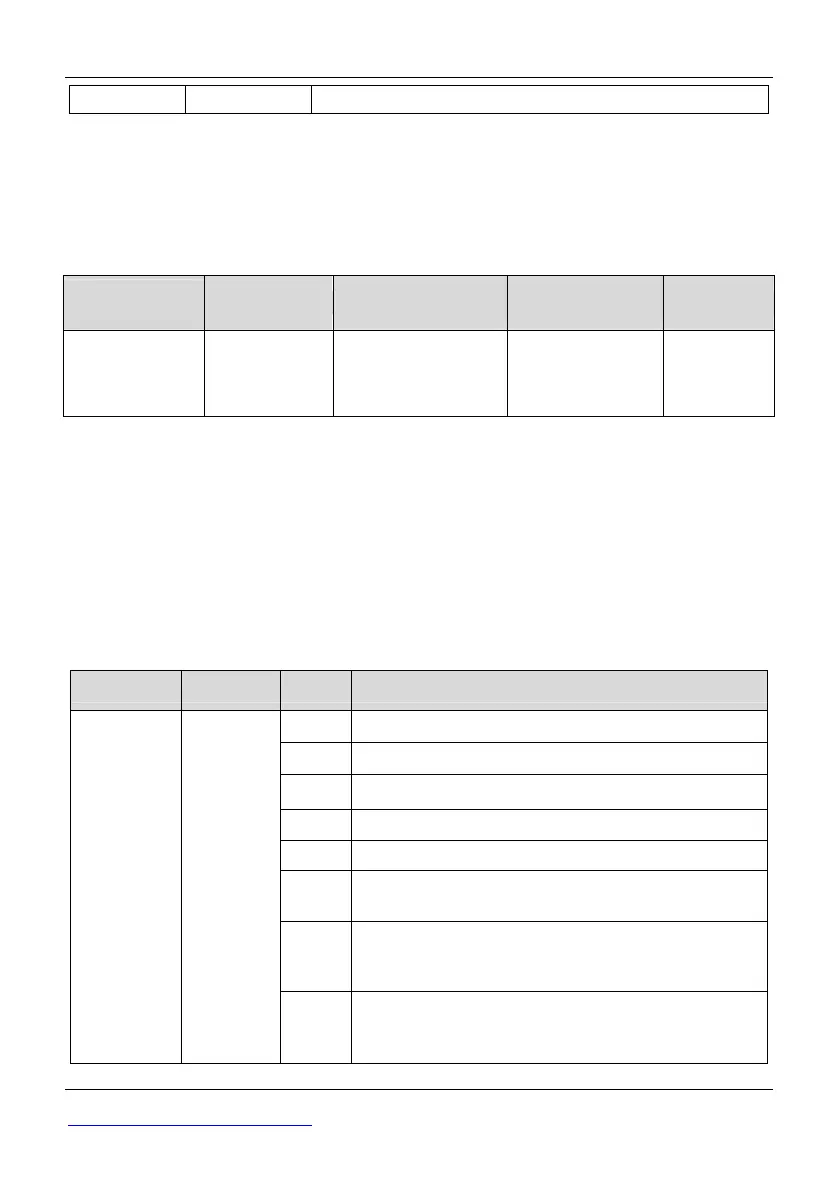
Save parameters [Enter instruction] (Only for write)
MODBUS
address
Name Content Setting range Initial value
00FFH
Enter
instruction
To save the data and
write the data to
EPROM
0100H ~ 1004H
—
To save the parameters stored in RAM to EEPROM, Write the saved data corresponding
MODBUS address to register 0x00FF, the data will be saved.
Because the life of EEPROM is about 100 thousand times. So do not use the saving
data instruction continually.
The saving data instruction function is like the “ENTER” key function of keyboard.
Pressing the “ENTER” key can save the modified parameter value into EEPROM. The
MODBUS address 0x00FF is specially designed to save RAM data. It can be only write,
if read this address; write wrong address response error will creat (communication error
code number 02H).
●Monitor Data (Only read-out is possible)
Address Name BIT Content
0 During Running 1: Running
1 During Reverse 1: Reverse
2 During Reset 1: Reset
3 Fault 1: Fault
4 Warning 1: Warning
5
Multi-function contact output 1 (1: DO ON
(closed) 0: OFF (open))
6
Multi-function contact output 2 (1:Y1
ON(closed) 0: OFF (open)) (Only
35R5GB/37R5PB ~ 3500G)
0020H
Status
signal
7
Multi-function contact output 3(1:Y2 ON(closed)
0: OFF (open)) (Only 35R5GB/37R5PB ~
3500G)



 To Next Page