32
Alpha E-Tec S 20 and 30 - Commissioning
5.13 PROGRAMMING THE PCB
The boiler has the ability to programme
several operational parameters.
By modifying these parameters as
described below, the boiler can be
adapted according to specific needs.
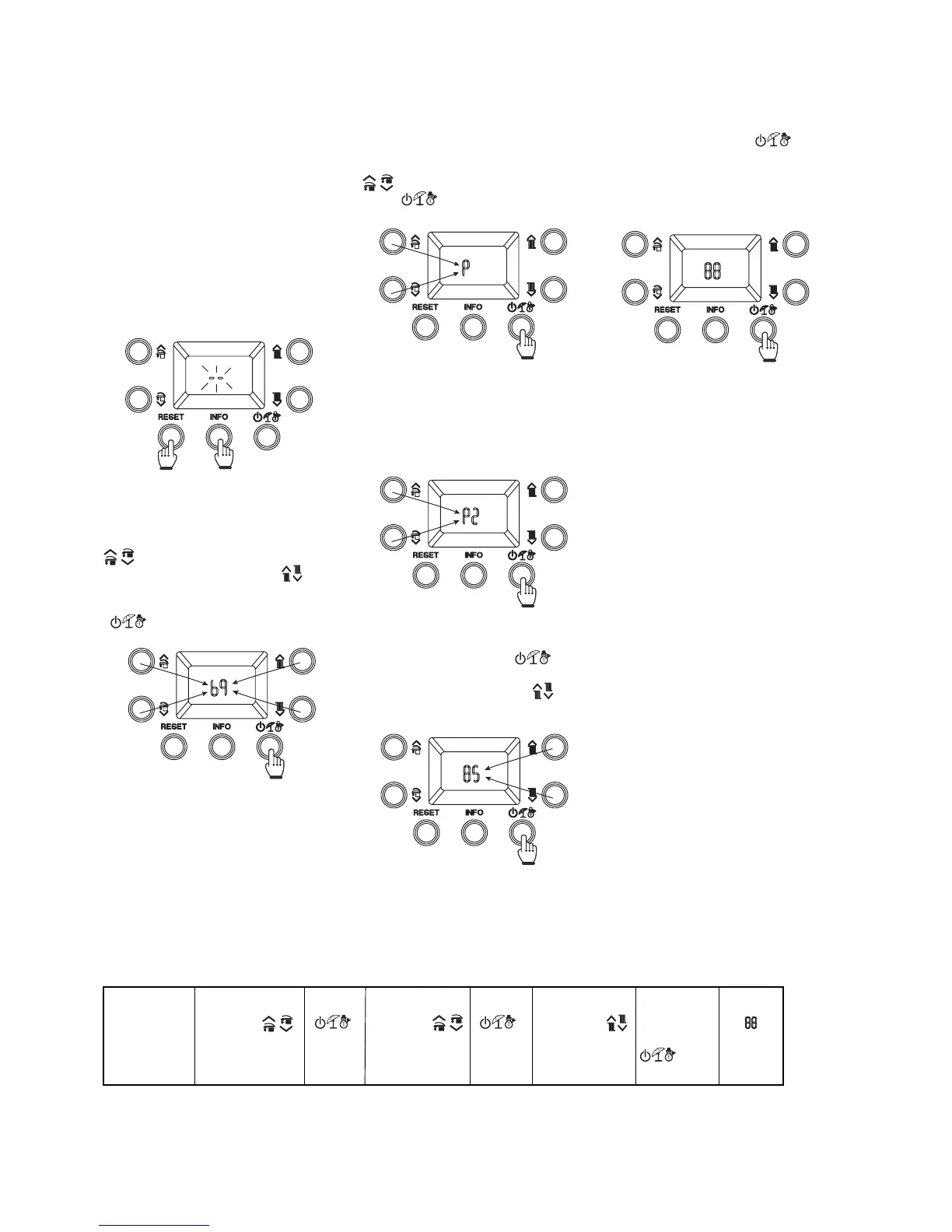
To access the programming menu,
press and hold the (RESET) and
(INFO) buttons at the same time
for 5 seconds, the display will show
two flashing dashes (- -), next enter
the password '69' to access the
programming menu.
Programming sequence
RESET + INFO
> 5 secs
Menu
'P'
't'
'A'
'S'
← RESET
→
P0 - P5
t0 - t9
A0 - A6
S0 - S2
← RESET
→
Parameter
value
← RESET
(Without
memorising)
> 1 sec
(Memorise)
Fig. 5.4
Fig. 5.5
Fig. 5.6
Fig. 5.7
Fig. 5.8
Fig. 5.9
Once in the menu you can scroll through
the four submenus (P, t, A, S) by
pressing the DHW up and down buttons
( ), to access the menu press the
button (
).
Press the mode button (
) for more than 1 second to store
the parameter value. Confirmation
is given by the numbers 88 which
appear for 2 seconds.
To enter the first digit of the password
use the DHW up and down buttons (
), to enter the second digit use
the CH up and down buttons ( ). To
confirm the password and access the
menu, press the operating mode button
(
).
The first digit of the display shows the ID
of the parameter, while the second digit
shows its number.
Pressing the mode button ( )
displays the parameter and by pressing
the CH up and down buttons (
) you
can adjust its value.
If you want to exit a parameter
without changing its value, press
the (RESET) button.
Wait for 15 minutes or press
the (RESET) button to exit the
programming mode.


 To Next Page