36
Alpha E-Tec S 20 and 30 - Routine Servicing
5. Check that the condensate trap drain pipe is connected and all joints are sound.
6. Record details of the service in the Service Record at the back of these instructions.
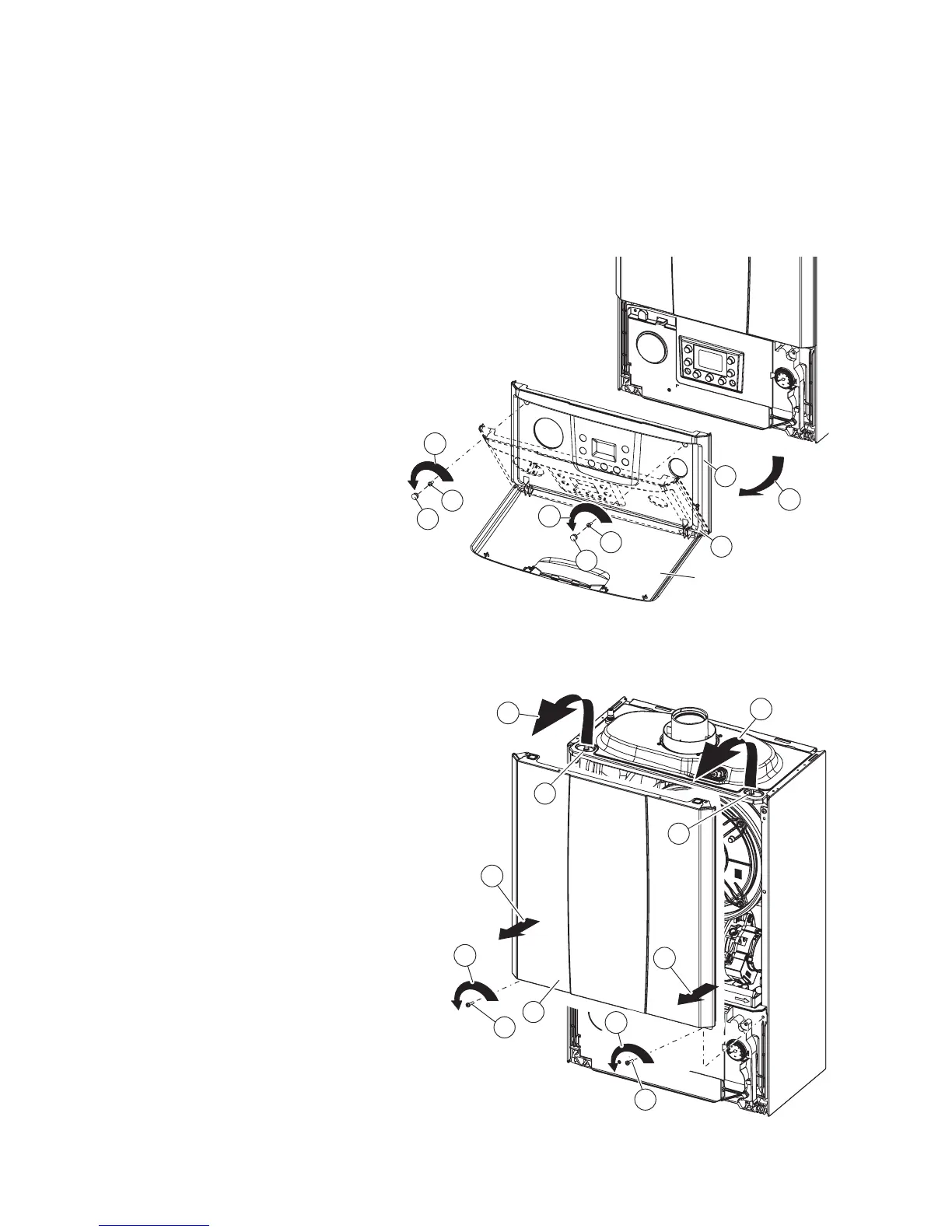
6.2 CASING REMOVAL - Figs. 6.1, 6.2, 6.3 and 6.4
To facilitate boiler servicing and maintenance the casing can be completely removed as follows:
Case front panel - Fig. 6.2
3. Remove the two screws 'D'.
4. Pull the front panel 'E' slightly towards you.
5. Release the front panel 'E' from pins 'F' pulling
it towards you while pushing it upwards at the
same time.
Take care not to damage the insulation on the back of
the panel as this forms part of the casing room seal.
Fig. 6.1
Fig. 6.2
Control panel cover - Fig. 6.1
1. Open the lower cover. Remove the two screw
cover plugs 'A' and remove the screws 'B'.
2. Lower the front panel 'C' towards you and
release the covers from the lower fixings.
D
E
5
5
F
F
4
4
3
D
3
B
A
1
B
A



 To Next Page