AlphaSmart 3000 11
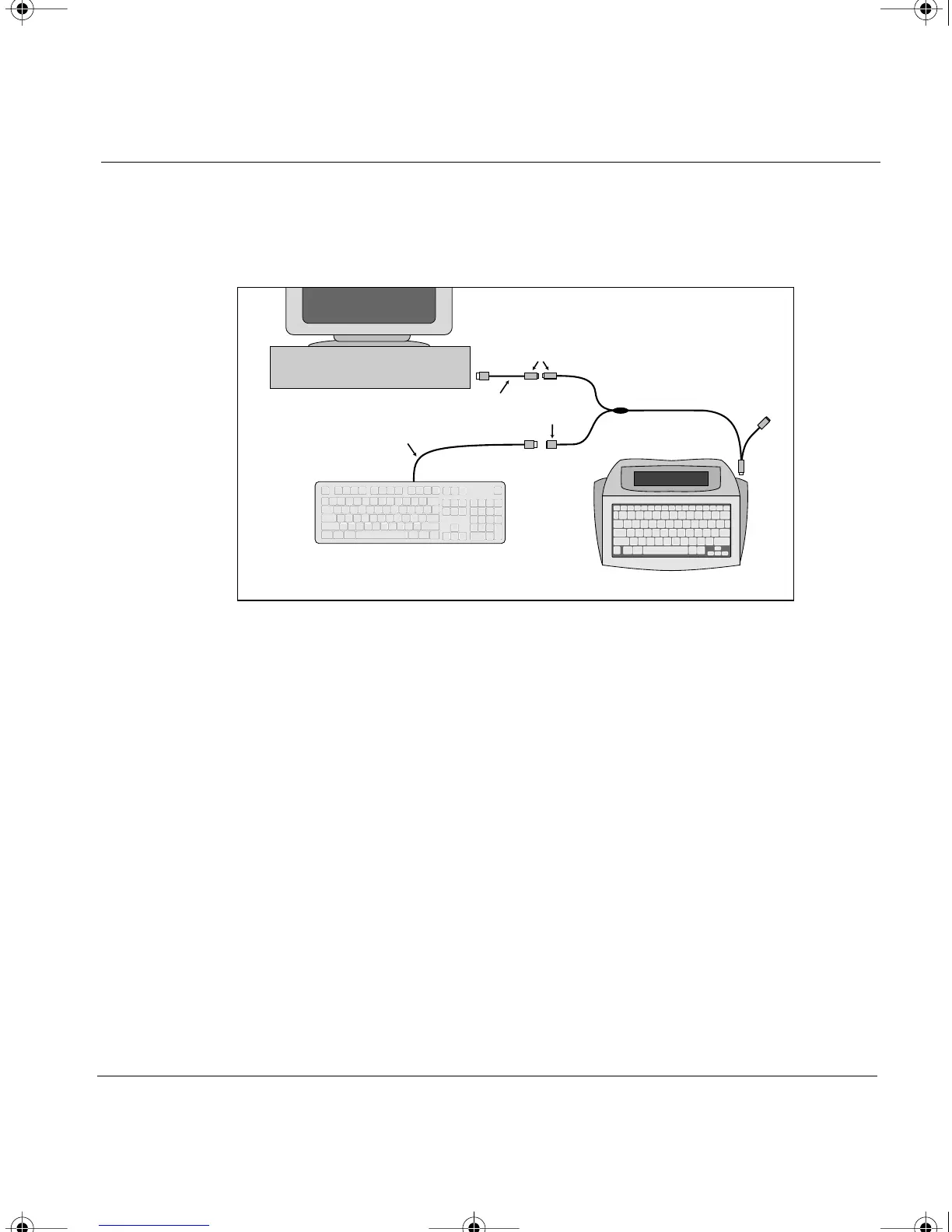
connect the computer keyboard cable into the purple end of the PC Y
cable, labeled “Connect to PC keyboard cable” (see diagram below).
3. Plug the grey end into the computer port on the right side of your
AlphaSmart 3000.
4. With the PC Y cable installed, turn on the computer, wait for
complete boot up, and test your regular keyboard for operation.
Note:
The PC Y cable may also be used to connect a PC to an AlphaSmart
2000 or AlphaSmart Pro. To do so, connect the blue end of the PC Y cable
(instead of the grey end) into the computer port on the right side of your
AlphaSmart.
Warning: Always leave the PC Y cable installed. If for any reason you
need to remove the PC Y cable from the computer, do so when your
computer is turned off.
AlphaSmart
PC Keyboard
PC Keyboard
Cable
Grey
Purple
PC Y Cable
PC
Orange
Blue
Purple
Adapter Cable
Installation of the PC Y cable when the keyboard has a 5-pin connector
AS3000UG.book Page 11 Tuesday, June 25, 2002 12:19 PM



 To Next Page