87-EN
01GB06INA-W900E.fm
ALPINE INA-W900E 68-16909Z25-A (EN)
MUTE Button
Lowers the volume by 20 dB instantly. Press the button
again to cancel.
UP Button
, , ,
ENT. Button
Enters the selected item.
Button
Numeric Keypad
Inputs numbers.
MONITOR Button
Not used.
ANGLE Button
SUBTITLE Button
• The SETUP operation of the unit cannot be carried out from the
remote control.
• Some operations may not be possible depending on the disc.
When Using the Remote Control
• Point the remote control at the remote sensor within
about 2 metres.
• It may not be possible to operate the remote control if
the remote control sensor is exposed to direct
sunlight.
• The remote control is a small, lightweight precision
device. To avoid damage, short battery life,
operational errors and poor response, observe the
following.
- Do not subject the remote control to excessive
shock.
- Do not put in a trouser pocket.
- Keep away from food, moisture and dirt.
- Do not place in direct sunshine.
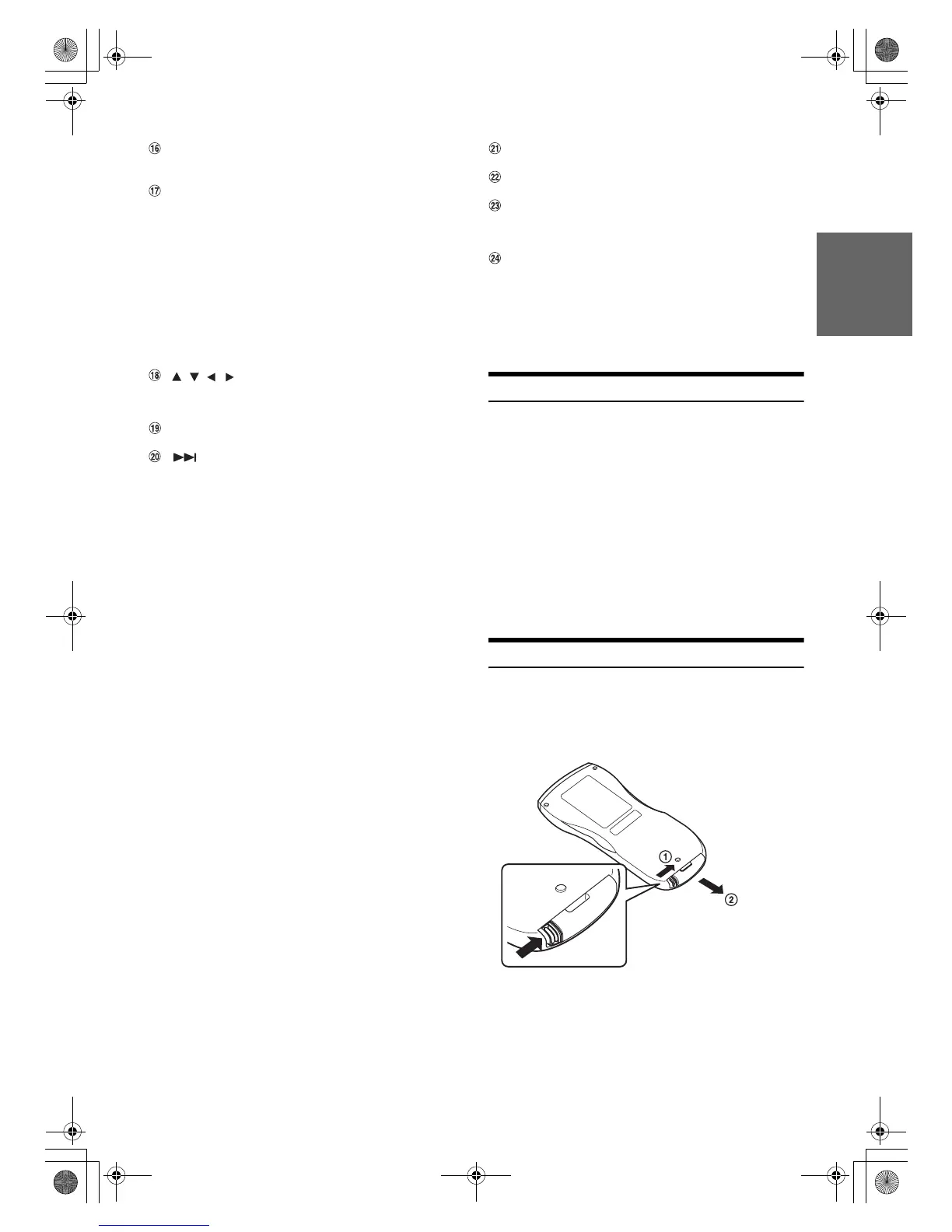
Battery Replacement
Battery type: CR2025 battery or equivalent.
1
Opening the battery case
Slide out the battery cover while firmly pressing in the
direction of the arrow.
Radio mode: Selects, in ascending order, stations
programmed into the radio’s presets.
MP3/WMA/AAC mode:
Folder Select (UP) Button to selects the
folder.
Changer mode:
DISC Select (UP) Button selects a disc in
ascending order.
iPod/iPhone mode:
Selects a playlist/artist/album/genre/
composer/podcast in ascending order.
DVD Video mode:
Selects an item displayed in the screen.
Radio mode: SEEK (UP) button
CD/Changer mode:
Press the button to advance to the beginning
of the next track. Press and hold to fast
forward.
MP3/WMA/AAC iPod mode:
Press the button to advance to the beginning
of the next file. Press and hold to fast
forward.
DVD Video/Video CD:
• Move to the desired position on the disc.
• During playback, press and hold for more
than 1 second to forward the disc at
double speed. Hold for more than 5
seconds to forward the disc at 8 times the
normal speed. Hold for more than 10
seconds to forward the disc at 21 times
the normal speed.
DVD Video/Video CD:
• When pressed and held in while in the
pause mode, the disc is played in slow
motion at 1/8th the normal speed. When
held in for 5 more seconds, the slow
motion speed switches to 1/2 the normal
speed.
• The picture is forwarded by one frame
each time the button is pressed in the
pause mode.
DVD Video mode:
Switches the angle of the picture.
DVD Video mode:
Switches the subtitle.
01GB00INA-W900E.book Page 87 Monday, September 13, 2010 9:52 AM



 To Next Page