EasyManua.ls Logo

Alpine S-A60M - SYSTEM DIAGRAMS

Alpine S-A60M
28 pages
Print Icon
To Next Page IconTo Next Page
To Previous Page IconTo Previous Page
Loading...
SYSTEM
DIAGRAMS
Before
making
a connection, check
the
total
number
of
impedance
of
the
speaker connected
to
the
unit.
If
you have any questions,
contact
the
nearest Alpine dealer.
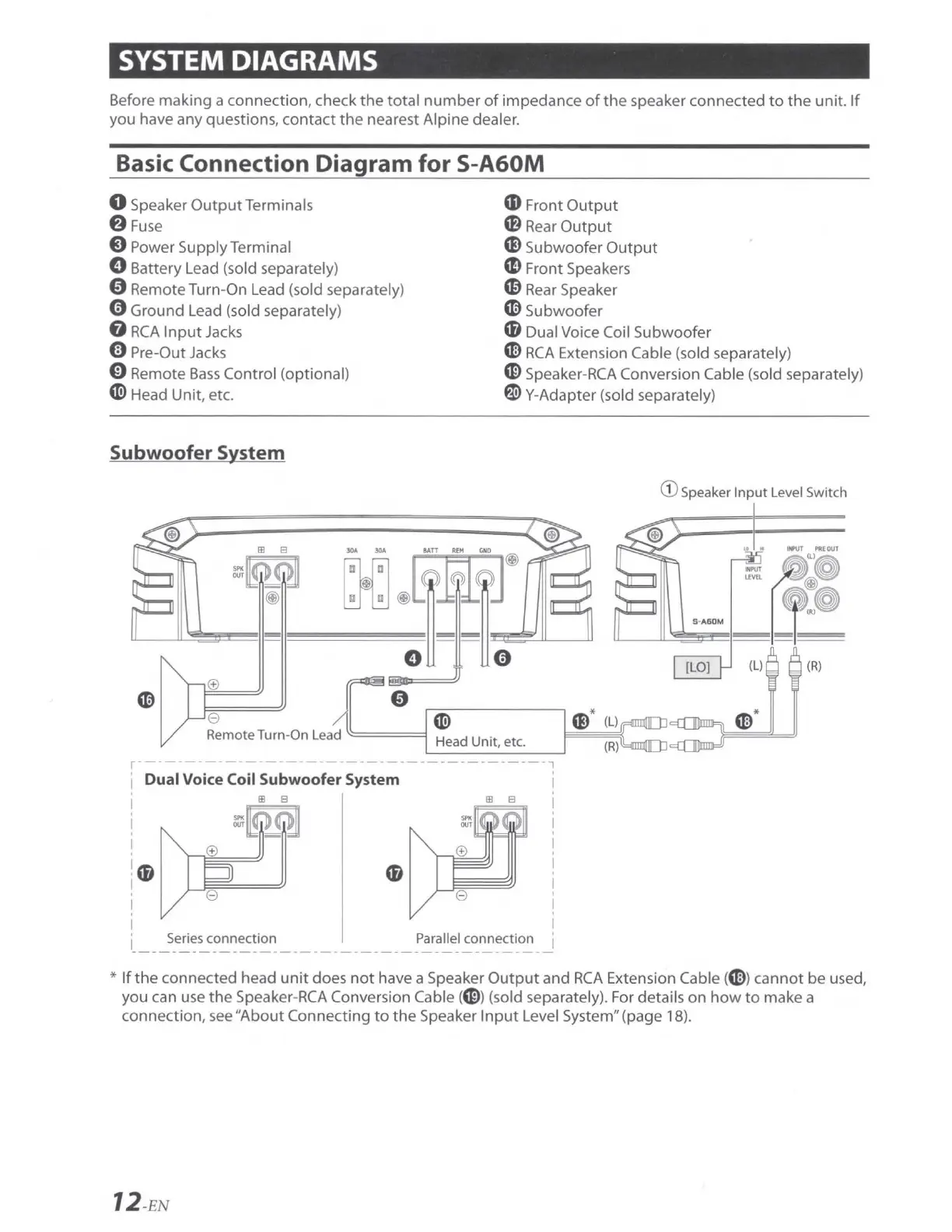
Basic Connection Diagram
for
S-A60M
0 Speaker
Output
Terminals
8
Fuse
8 Power Supply Terminal
0 Battery Lead (sold separately)
0 Remote Turn-On Lead (sold separately)
0 Ground Lead (sold separately)
8
RCA
Input
Jacks
0 Pre-Out Jacks
CD
Front
Output
a}
Rear
Output
CS
Subwoofer
Output
m Front Speakers
m
Rear
Speaker
~
Subwoofer
'8 Dual Voice Coil Subwoofer
0 Remote
Bass
Control
(opt
ional)
~
Head Unit, etc.
~
RCA
Extension Cable (sold separatel
y)
CID
Speaker-
RCA
Conversion Cable
(so
ld separately)
f1i>
Y-Adapter
(so
ld separatel
y)
Subwoofer System
00
@~~®)
eJ
~
J0
oa
JJ
0
0
~
Remote Turn-On Lead
=====l
Head
Unit
, etc.
r------------
-
-----
--------------------7
' Dual Voi
ce
Coil Subwoofer System
Ill 8
~P~
I
!m
I
0
Parallel connection
cs
* (L)
(R)
G) Speaker
Input
Level Switch
[LO]
(L)
(R
)
*
If
the connected head
unit
does
not
have a Speaker
Output
and
RCA
Extension Cable(~ )
cannot
be
used,
you can use
the
Speaker-
RCA
Conversion Cable (
CID
) (sold separately). F
or
details
on
how
to
make a
connection,
see
"About
Connecting
to
the
Speaker
Input
Level System" (page 18).
12
-EN

Related product manuals