7
PAIRING & USING YOUR SPEAKER(S)
You can pair up to two TZL199 fountain speakers to a phone or
Bluetooth enabled device. Speakers should be within 25 feet (7.6 m) of
each other. Bluetooth device range is 50 feet (15 m).
BEFORE YOU BEGIN: Make sure the transformer is plugged in and has power.
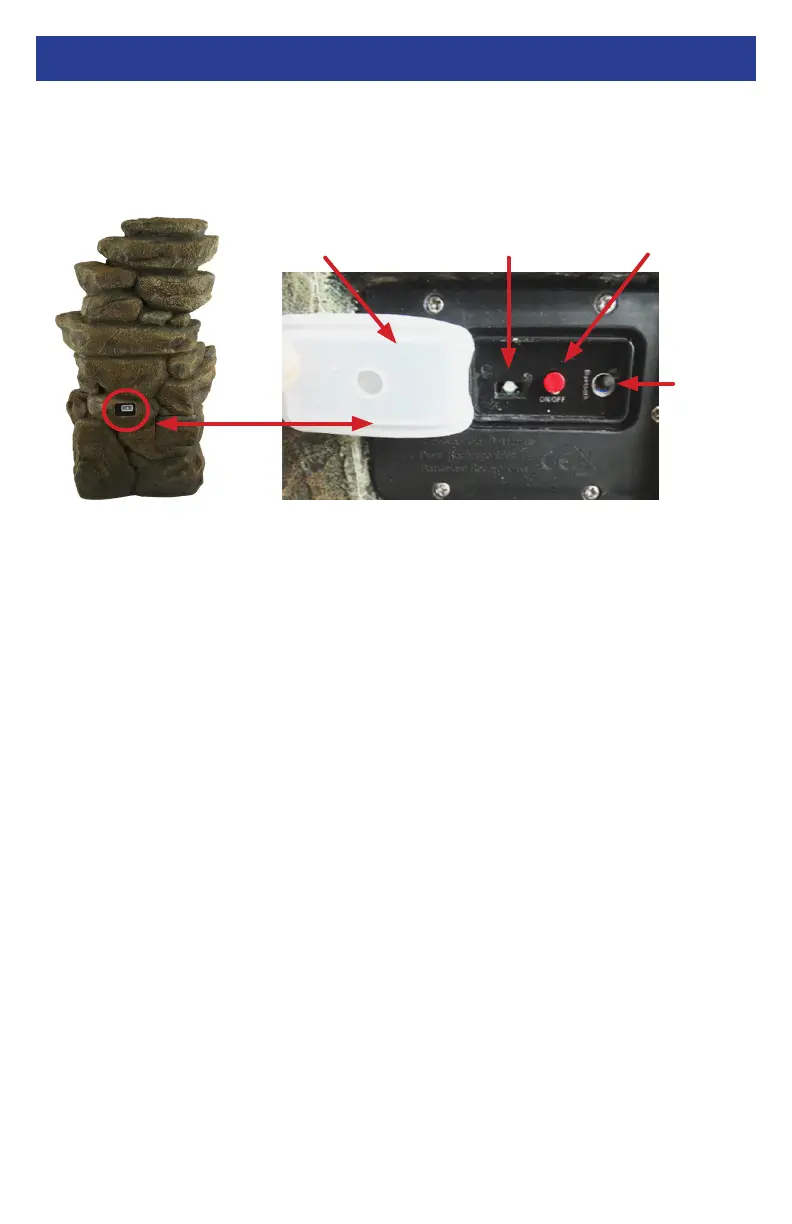
Open the white protective cover on the back panel to access the controls. Make sure
your Bluetooth device is on and within 3 feet of the fountain.
Pairing One Speaker with a Bluetooth Device
1. Press the red ON/OFF button to turn your speaker on. You will
hear “Alpine Corporation” and the Bluetooth Indicator Light will
ash between red and blue.
2. Make sure your Bluetooth device is within 3 feet of the speaker
and is turned on with your Bluetooth set to search for devices.
◊ Pairing an iOS Phone/Device:
- Go to Settings > Bluetooth. Make sure Bluetooth is ON.
◊ Pairing an Android Phone/Device:
- Go to Settings >Bluetooth.
- Search for devices. Make Sure Bluetooth is ON.
◊ Pairing other Cell Phones/Devices:
- Review the instruction manual that came with your phone/device.
3. Select “Alpine Corporation TZL199” from the list of discovered
Bluetooth devices. You will hear “Bluetooth is connected” when the
device connects to the speaker.
4. After a successful pairing, you will hear a tone and the Bluetooth
Indicator Light will slowly ash blue. Your device will be paired
anytime it is on and you are within range.
PAIRING & USING YOUR SPEAKER(S)
Open White
Protective Cover
ON / OFF
Button
Bluetooth
Indicator Light
PAIR
Button
Back
Panel
on Back
Fountain



 To Next Page