Aircraft Systems
FLIGHT CONTROLS
AL250 Flight Manual
MEP
6-1 FLIGHT CONTROLS
The flight control system consists of primary and secondary controls.
6-1-1 PRIMARY FLIGHT CONTROLS
The trainer is equipped with wheel, stick and pedals for the pilot and, as an option, the
copilot. The systems are interconnected.
WHEEL
Turning the wheel controls roll (i. e. the simulated aircraft movement about the longitudinal
axis).
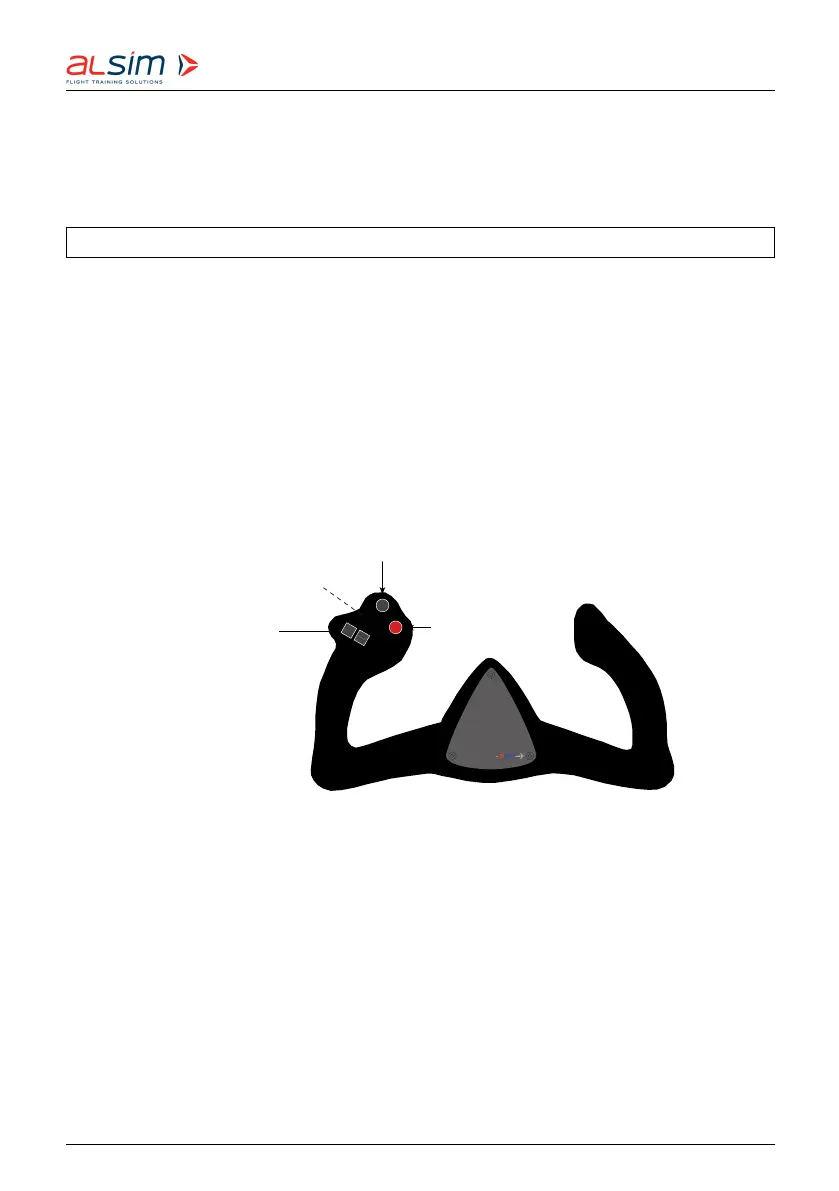
On the wheel there are buttons for disconnecting the autopilot (red) and starting/ stopping/
resetting the stopwatch (black) as well the electric pitch trim swit ch. On the wheel back
there is the PTT (push to talk) — the transmission switch for the communications system.
Electric
pitch trim
Autopilot
disengage
Stopwatch start/stop/reset
Transmission switch
Figure 6.1: Pilot’s wheel
STICK
Moving the stick fore and aft controls pitch (i. e. the simulated aircraft movement about the
lateral axis). Pushing the stick forward lowers the simulated aircraft nose, pulling the wheel
back raises it.
Rev. 1.8 © 2021 ALSIM - All Rights Reserved 6-4



 To Next Page