37
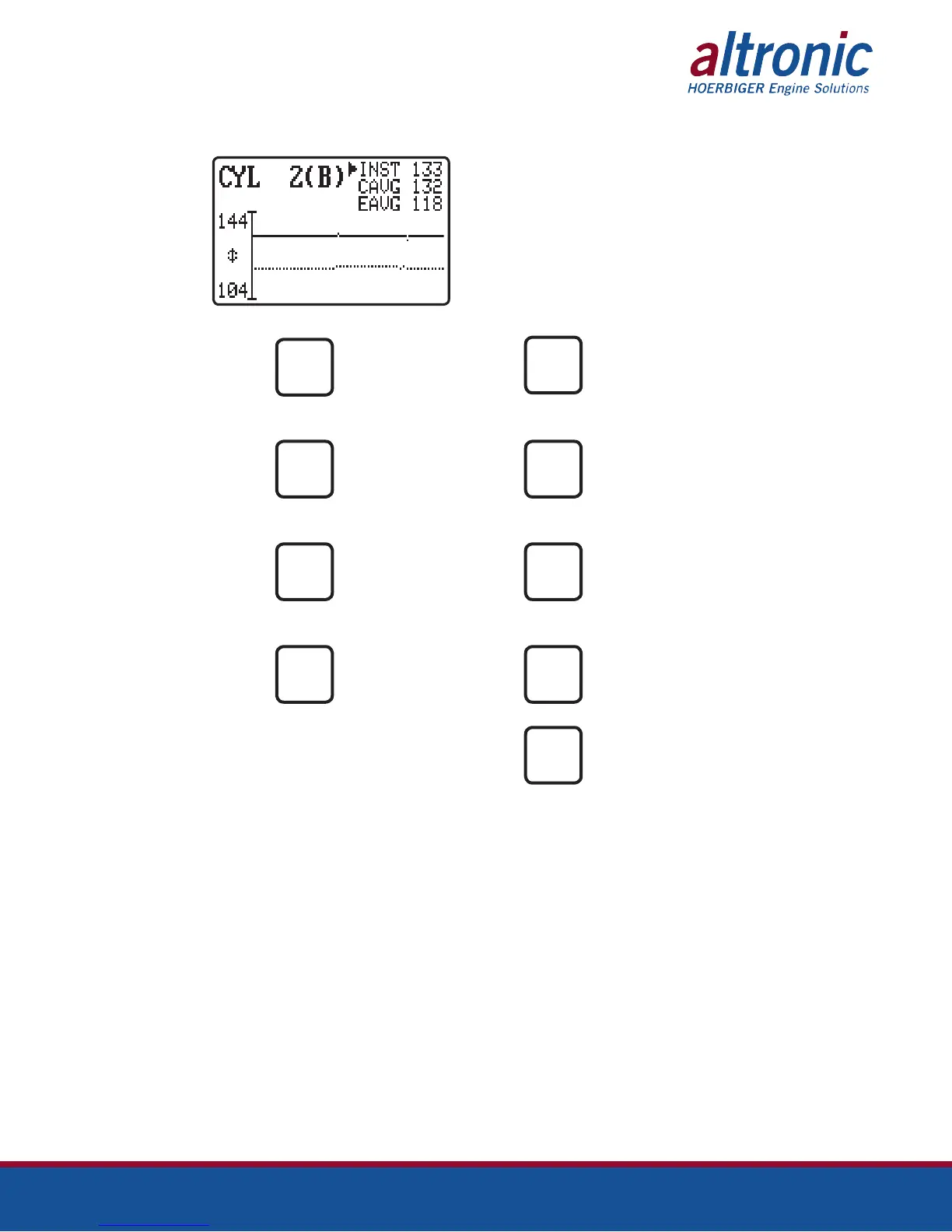
cylinder data while the dashed line is the engine average. In this picture, 144
corresponds to the spark number that is top of the graph and 104 is the bottom.
PRESS TO TOGGLE PRESS TO CHANGE THE
BETWEEN GRAPHING LAYOUT OF THE GRAPH
INST AND CAVG
MAN
ENTER
PRESS TO VIEW THE PRESS TO ADVANCE TO
DATALOG GRAPH THE NEXT CYLINDER
AUTO
NEXT
PRESS TO ACCESS THE PRESS TO VIEW THE
GRAPH IN SECTION 13.2 CURRENT SELECTED
CYLINDER
F3
F1
PRESS TO ADJUST THE PRESS TO ADJUST THE
CURRENT SELECTED CURRENT SELECTED
CYLINDER SPARK OFFSET CYLINDER TIMING OFFSET
F4
TIMING
PRESS TO EXIT
ESC
Pressing ENTER the first time will display ↓↑ and allows the user to move the
graphed lines up and down using the arrow keys. This changes the spark number
used for the top and bottom limits of the graph. Pressing ENTER the second time
will display the ↕ and allows the user to change the zoom level using the arrow
keys. Pressing ENTER a third time exits the adjustments.


 To Next Page