CONTROL UNITS UTR230868 / UTR4008681414
SETTINGS
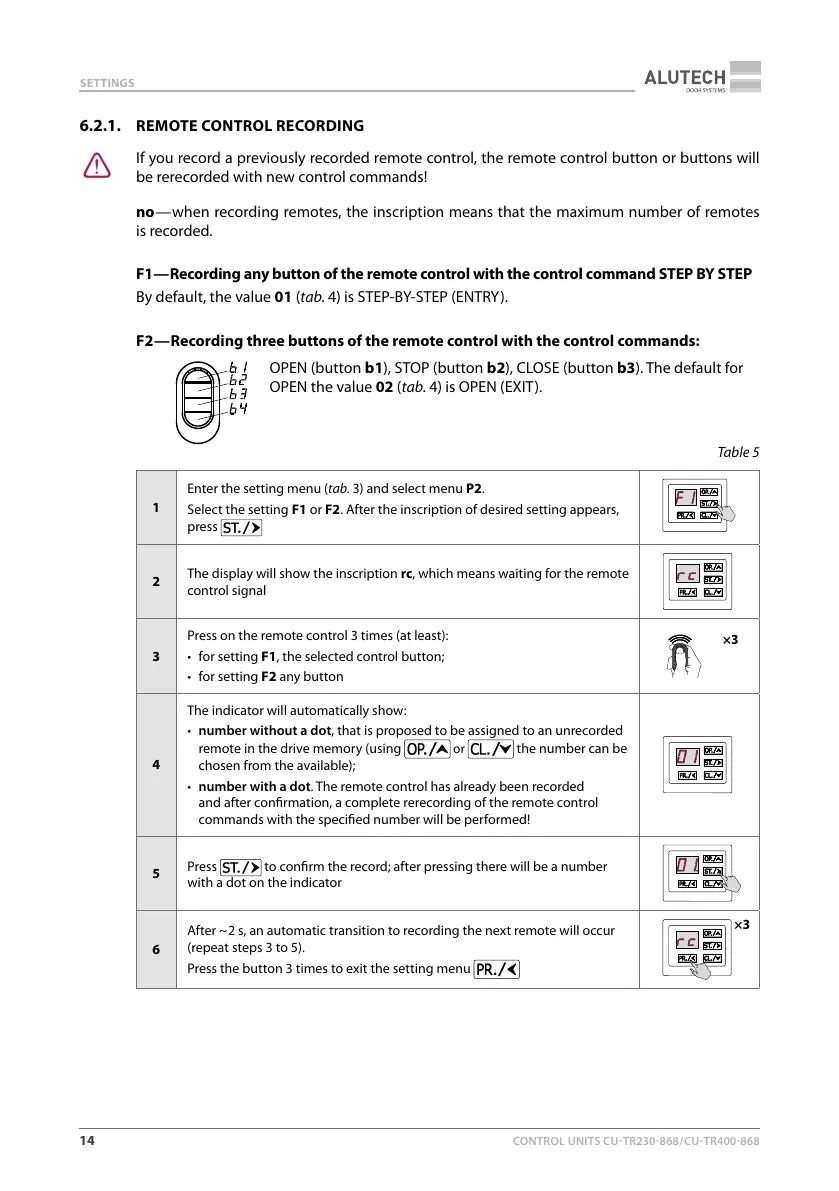
6.2.1. REMOTE CONTROL RECORDING
Y
If you record a previously recorded remote control, the remote control button or buttons will
be rerecorded with new control commands!
no — when recording remotes, the inscription means that the maximum number of remotes
is recorded.
F1 — Recording any button of the remote control with the control command STEP BY STEP
By default, the value 01 (tab.4) is STEP-BY-STEP (ENTRY).
F2 — Recording three buttons of the remote control with the control commands:
OPEN (button b1), STOP (button b2), CLOSE (button b3). The default for
OPEN the value 02 (tab.4) is OPEN (EXIT).
Table5
1
Enter the setting menu (tab.3) and select menu P2.
Select the setting F1 or F2. After the inscription of desired setting appears,
press
2
The display will show the inscription rc, which means waiting for the remote
control signal
3
Press on the remote control 3 times (at least):
• for setting F1, the selected control button;
• for setting F2 any button
×3
4
The indicator will automatically show:
• number without a dot, that is proposed to be assigned to an unrecorded
remote in the drive memory (using
or the number can be
chosen from the available);
• number with a dot. The remote control has already been recorded
and after conrmation, a complete rerecording of the remote control
commands with the specied number will be performed!
5
Press
to conrm the record; after pressing there will be a number
with a dot on the indicator
6
After ~ 2 s, an automatic transition to recording the next remote will occur
(repeat steps 3 to 5).
Press the button 3 times to exit the setting menu
×3



 To Next Page