CONTROL UNITS UTR230868 / UTR400868 1515
SETTINGS
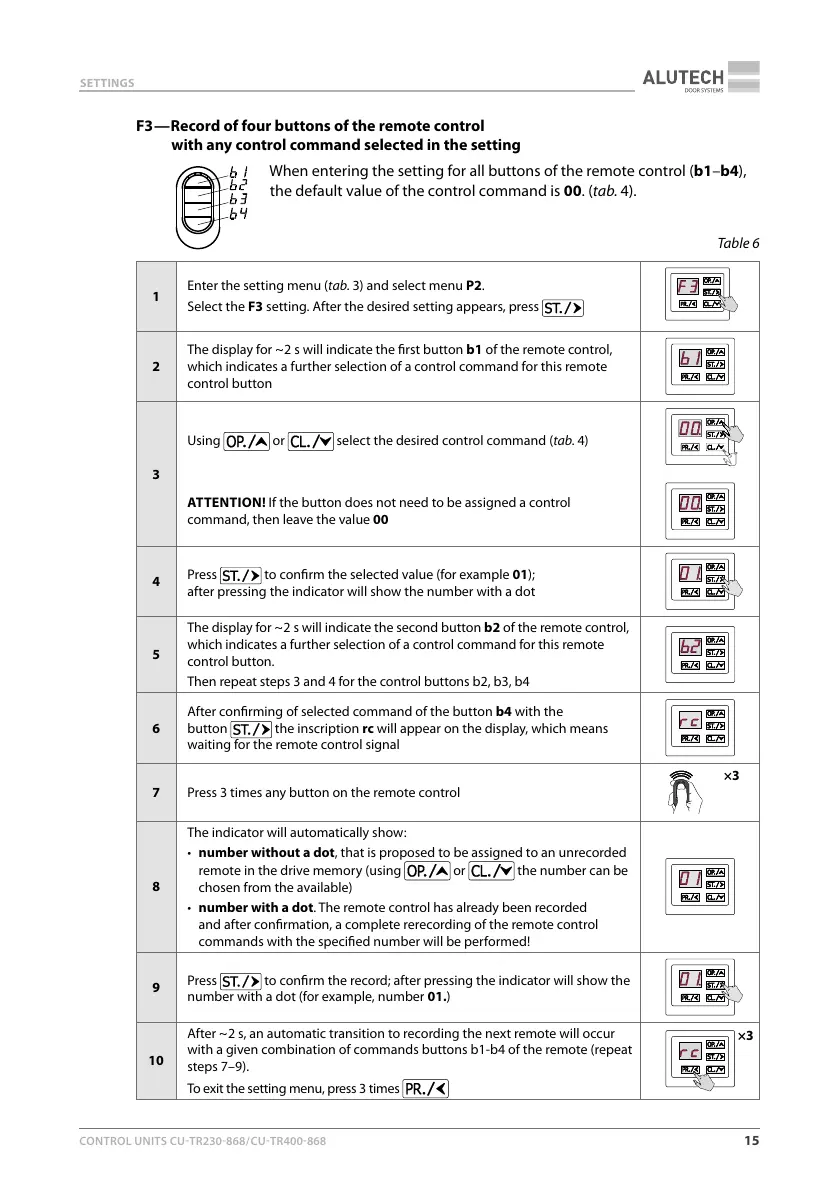
F3 — Record of four buttons of the remote control
with any control command selected in the setting
When entering the setting for all buttons of the remote control (b1–b4),
the default value of the control command is 00. (tab.4).
Table6
1
Enter the setting menu (tab.3) and select menu P2.
Select the F3 setting. After the desired setting appears, press
2
The display for ~ 2 s will indicate the rst button b1 of the remote control,
which indicates a further selection of a control command for this remote
control button
3
Using
or select the desired control command (tab.4)
ATTENTION! If the button does not need to be assigned a control
command, then leave the value 00
4
Press
to conrm the selected value (for example 01);
after pressing the indicator will show the number with a dot
5
The display for ~ 2s will indicate the second button b2 of the remote control,
which indicates a further selection of a control command for this remote
control button.
Then repeat steps 3 and 4 for the control buttons b2, b3, b4
6
After conrming of selected command of the button b4 with the
button the inscription rc will appear on the display, which means
waiting for the remote control signal
7 Press 3 times any button on the remote control
×3
8
The indicator will automatically show:
• number without a dot, that is proposed to be assigned to an unrecorded
remote in the drive memory (using
or the number can be
chosen from the available)
• number with a dot. The remote control has already been recorded
and after conrmation, a complete rerecording of the remote control
commands with the specied number will be performed!
9
Press
to conrm the record; after pressing the indicator will show the
number with a dot (for example, number 01.)
10
After ~ 2 s, an automatic transition to recording the next remote will occur
with agiven combination of commands buttons b1-b4 of the remote (repeat
steps 7–9).
To exit the setting menu, press 3 times
×3



 To Next Page