CONTROL UNITS UTR230868 / UTR4008681818
SETTINGS
6.2.4. DELETING THE REMOTE CONTROL AND DEFINING THE REMOTE RECORD
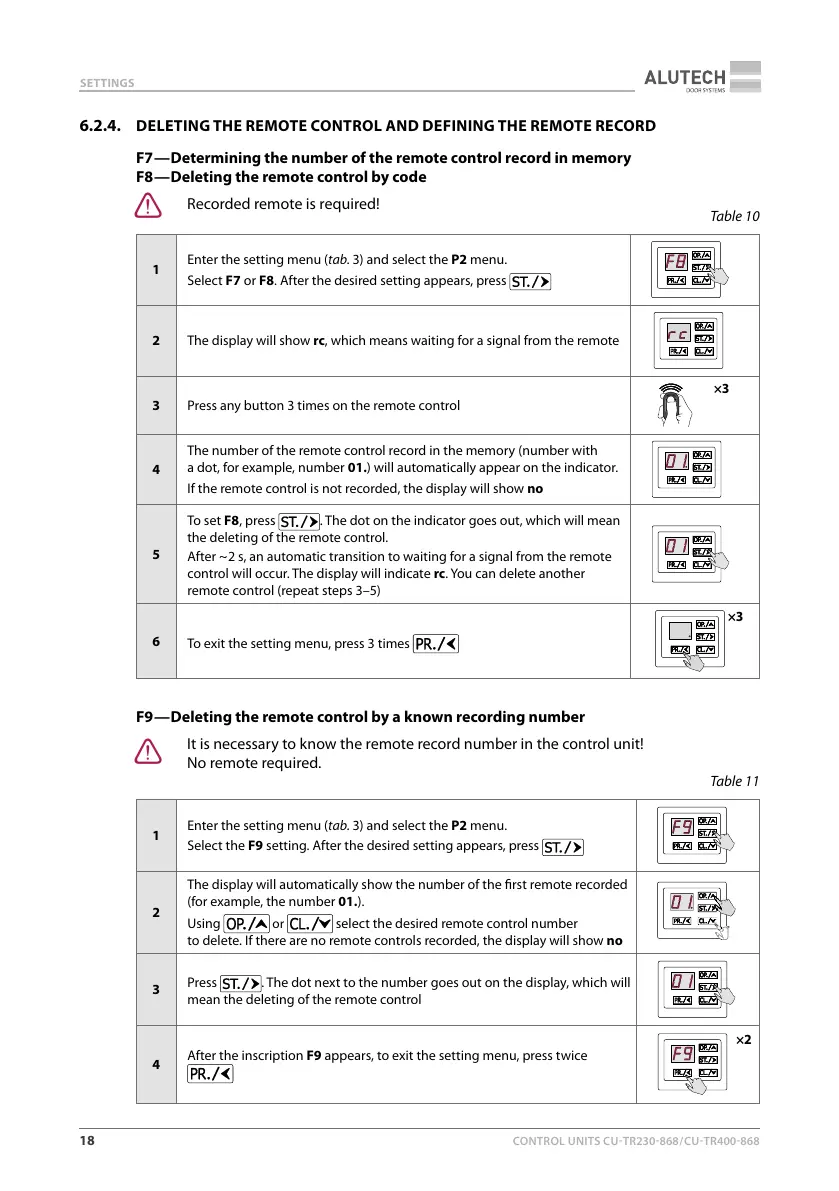
F7 — Determining the number of the remote control record in memory
F8 — Deleting the remote control by code
Y
Recorded remote is required!
Table10
1
Enter the setting menu (tab.3) and select the P2 menu.
Select F7 or F8. After the desired setting appears, press
2 The display will show rc, which means waiting for a signal from the remote
3 Press any button 3 times on the remote control
×3
4
The number of the remote control record in the memory (number with
adot, for example, number 01.) will automatically appear on the indicator.
If the remote control is not recorded, the display will show no
5
To set F8, press
. The dot on the indicator goes out, which will mean
the deleting of the remote control.
After ~ 2 s, an automatic transition to waiting for a signal from the remote
control will occur. The display will indicate rc. You can delete another
remote control (repeat steps 3–5)
6
To exit the setting menu, press 3 times
×3
F9 — Deleting the remote control by a known recording number
Y
It is necessary to know the remote record number in the control unit!
No remote required.
Table11
1
Enter the setting menu (tab.3) and select the P2 menu.
Select the F9 setting. After the desired setting appears, press
2
The display will automatically show the number of the rst remote recorded
(for example, the number 01.).
Using
or select the desired remote control number
todelete. If there are no remote controls recorded, the display will show no
3
Press
. The dot next to the number goes out on the display, which will
mean the deleting of the remote control
4
After the inscription F9 appears, to exit the setting menu, press twice
×2



 To Next Page