CONTROL UNITS UTR230868 / UTR400868 1717
SETTINGS
F5 — Changing the control command of a recorded remote control button
Y
Recorded remote is required!
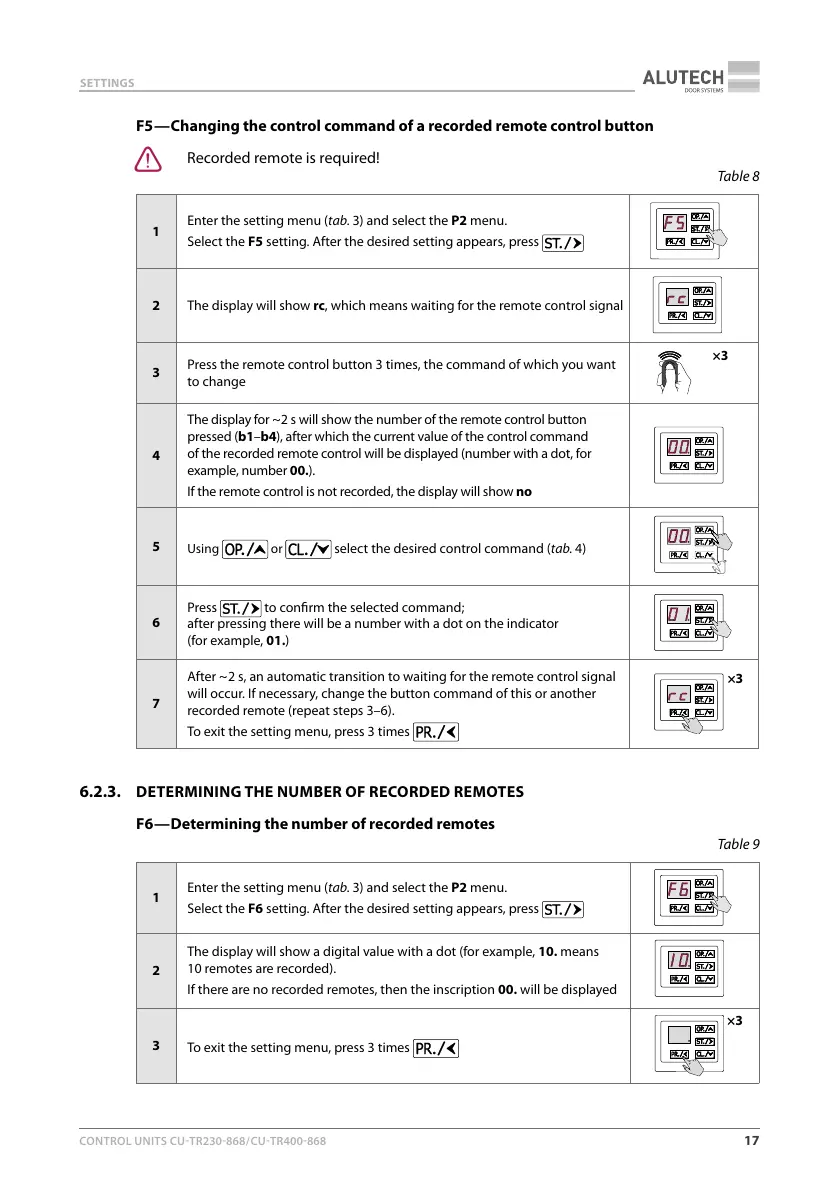
Table8
1
Enter the setting menu (tab.3) and select the P2 menu.
Select the F5 setting. After the desired setting appears, press
2
The display will show rc, which means waiting for the remote control signal
3
Press the remote control button 3 times, the command of which you want
to change
×3
4
The display for ~ 2 s will show the number of the remote control button
pressed (b1–b4), after which the current value of the control command
of the recorded remote control will be displayed (number with a dot, for
example, number 00.).
If the remote control is not recorded, the display will show no
5
Using
or select the desired control command (tab.4)
6
Press
to conrm the selected command;
after pressing there will be a number with a dot on the indicator
(forexample, 01.)
7
After ~ 2 s, an automatic transition to waiting for the remote control signal
will occur. If necessary, change the button command of this or another
recorded remote (repeat steps 3–6).
To exit the setting menu, press 3 times
×3
6.2.3. DETERMINING THE NUMBER OF RECORDED REMOTES
F6 — Determining the number of recorded remotes
Table9
1
Enter the setting menu (tab.3) and select the P2 menu.
Select the F6 setting. After the desired setting appears, press
2
The display will show a digital value with a dot (for example, 10. means
10remotes are recorded).
If there are no recorded remotes, then the inscription 00. will be displayed
3
To exit the setting menu, press 3 times
×3



 To Next Page