CONTROL UNITS UTR230868 / UTR4008682222
SETTINGS
MENU SETTING DESCRIPTION VALUES
FACTORY
VALUE
P5
F3 Operating time when opening 01, 02, 03…99:
01 — 1 s
99 — 99 s
99.
F4 Operating time when closing
Y
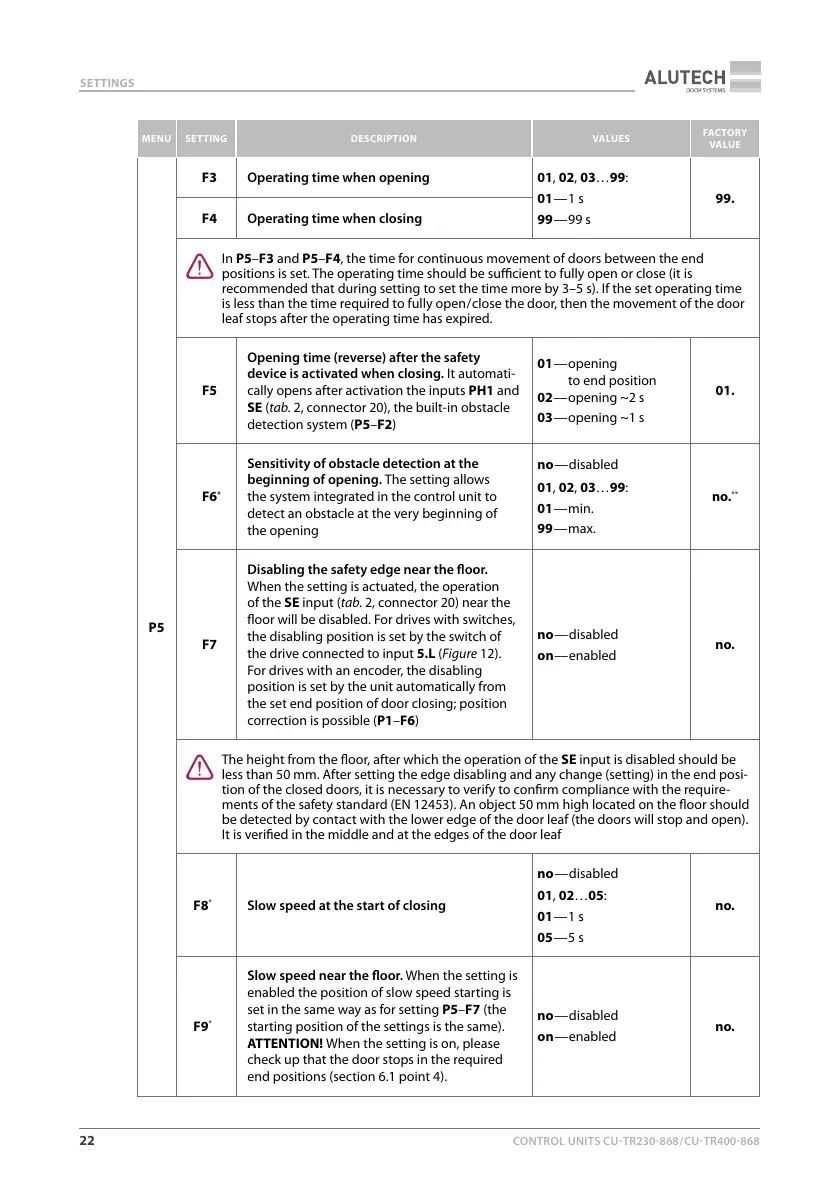
In P5–F3 and P5–F4, the time for continuous movement of doors between the end
positions is set. The operating time should be sucient to fully open or close (it is
recommended that during setting to set the time more by 3–5 s). If the set operating time
is less than the time required to fully open / close the door, then the movement of the door
leaf stops after the operating time has expired.
F5
Opening time (reverse) after the safety
device is activated when closing. It automati-
cally opens after activation the inputs PH1 and
SE (tab.2, connector 20), the built-in obstacle
detection system (P5–F2)
01 — opening
to end position
02 — opening ~2s
03 — opening ~1s
01.
F6
*
Sensitivity of obstacle detection at the
beginning of opening. The setting allows
the system integrated in the control unit to
detect an obstacle at the very beginning of
the opening
no — disabled
01, 02, 03…99:
01 — min.
99 — max.
no.
**
F7
Disabling the safety edge near the oor.
When the setting is actuated, the operation
of the SE input (tab.2, connector 20) near the
oor will be disabled. For drives with switches,
the disabling position is set by the switch of
the drive connected to input 5.L (Figure12).
For drives with an encoder, the disabling
position is set by the unit automatically from
the set end position of door closing; position
correction is possible (P1–F6)
no — disabled
on — enabled
no.
Y
The height from the oor, after which the operation of the SE input is disabled should be
less than 50mm. After setting the edge disabling and any change (setting) in the end posi-
tion of the closed doors, it is necessary to verify to conrm compliance with the require-
ments of the safety standard (EN12453). An object 50 mm high located on the oor should
be detected by contact with the lower edge of the door leaf (the doors will stop and open).
It is veried in the middle and at the edges of the door leaf
F8
*
Slow speed at the start of closing
no — disabled
01, 02…05:
01 — 1 s
05 — 5 s
no.
F9
*
Slow speed near the oor. When the setting is
enabled the position of slow speed starting is
set in the same way as for setting P5–F7 (the
starting position of the settings is the same).
ATTENTION! When the setting is on, please
check up that the door stops in the required
end positions (section 6.1 point 4).
no — disabled
on — enabled
no.



 To Next Page